- Home
- Leading Self
- Goal Setting for Success Course
- Section 8.1, Library of Resources
Employee Goal Setting Resources for Your Team
Section 8.1: Library of Resources
As a people manager, your most powerful employee goal setting resources aren’t software platforms – they’re clear, practical tools you can actually use in real conversations with your team. When you have simple worksheets, frameworks, and scripts at your fingertips, it becomes much easier to help employees choose meaningful goals and follow through.
On this page, you’ll find ready-to-use employee goal setting tools and resources you can bring into your very next 1:1: worksheets, goal-setting frameworks, conversation guides, email templates, and manager checklists. Use them to help each team member build their own personal “goal setting resource library” they can rely on all year long as they plan, track, and reflect on their growth.

Allocating resources for employee goal setting provides a valuable opportunity for your team members, as well as long lasting benefits for your organization. When you provide clear goals and the right goal setting tools for employees, you help them grow, stay engaged, and contribute more fully as a valuable team member.
Our Goal Setting for Success program is just the right tool to assist you in setting goals for your team.
In the following information, we'll recap how to create and maintain a valuable library of goal setting tools and resources for continued growth and development.
Employee Goal-Setting Resource Library (Quick Access)
Use these quick links to grab the core employee goal setting resources you can use with your team right away. Open them before your next 1:1 so you can focus on the conversation, not searching for tools.
Life Balance – Success Wheel worksheet
(Help employees quickly see where work and life feel in or out of balance.)
Master Action Plan (M.A.P.) template
(Turn a clear goal into simple, step-by-step actions with dates and ownership.)
Goal-setting conversation agenda
(A 30–45 minute structure you can follow for every goal-setting 1:1.)
Sample invitation email
(Copy-and-paste email to invite employees into a positive, practical goal-setting meeting.)
Manager follow-up checklist
(Ensure you keep your commitments and reinforce momentum after the meeting.)
5-step goal-setting process
(Use this simple 5-step flow during reviews or check-ins to help employees set better goals.)
Why Employee Goal Setting Resources Matter
Every leader talks about the importance of setting goals, but far fewer provide simple goal setting tools and resources employees can actually use.
"The more you learn, the greater your chances for personal and professional success in your goal setting efforts."
Without clear employee goal setting resources, you and your team may experience:
- Vague expectations and confusion about priorities
- Missed deadlines and stressful “crunch times”
- Talented people who feel stuck, bored, or undervalued
With a few practical employee goal setting tools and resources in place, you can:
- Turn big ideas into clear, written goals
- Break those goals into manageable action steps
- Keep goals visible and top‑of‑mind over time
- Review and adjust goals together in a positive, constructive way
That’s what this chapter of the Goal Setting for Success personal goal setting course is all about: giving you a small but powerful library of goal setting resources for managers, leaders, and teams.
Key Employee Goal Setting Resources in This Chapter
In earlier chapters of this Goal Setting for Success course, you learned how to clarify what you want, set balanced goals, prioritize, and take consistent action.
In this section, we’ll focus on three categories of practical employee goal setting tools and resources you can add to your personal and organizational “library of resources”:
- Life Balance – Success Wheel
- Master Action Plan (M.A.P.)
- Additional tools from the Goal Setting for Success course (such as Facing Your Fears, Responding to Failure, Mastering Your Time, and Visualization Techniques for inspiration)
Together, these goal setting tools for leaders and teams help you and your employees set goals that are clear, balanced, and sustainable.
Life Balance – Success Wheel
The Life Balance – Success Wheel is a simple visual tool that helps you and your employees quickly see where life and work feel in balance – and where they don’t.
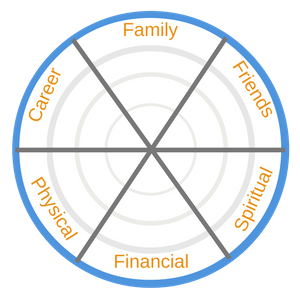
You choose several key categories (for example: Career, Financial, Health, Family, Personal Growth, Community, Fun & Recreation) and ask employees to rate each area on a scale (such as 1–10). When you connect the ratings on the wheel, it becomes instantly clear which areas are strong and which need attention.
Benefits of using the Life Balance tool with employees:
- Encourages honest reflection in a safe, structured way
- Helps you understand what really matters to each person
- Reveals stress points that may be affecting performance
- Opens the door for supportive coaching conversations
When you use this tool as part of your employee goal setting process, you’re not just focused on metrics – you’re focused on the whole person. That’s a powerful leadership message.
In Practice: How a Sales Manager Uses the Life Balance Tool in 1:1s
Here’s a simple example of how you might use the Life Balance – Success Wheel as an employee goal setting rtool during a one‑on‑one meeting with a sales representative.
First, you ask the employee to quickly rate each category on the wheel: Career, Financial, Health, Family, Personal Growth, Community, and Fun & Recreation. As they connect the dots, you both notice that “Health” and “Fun & Recreation” are rated very low compared to “Career” and “Financial”.
You might say:
“Thank you for being honest about where things are right now. I can see your career and financial areas are strong, but your health and personal time are suffering. How is that affecting your energy and performance?”
Together, you talk through the impact on their work: low energy in the afternoon, more sick days, and difficulty staying focused. From there, you choose one or two specific employee goals to improve balance, such as:
- “Walk for at least 20 minutes, 5 days per week, for the next 60 days.”
- “Block one uninterrupted evening per week for family time with no work emails.”
You can then support these with a Master Action Plan (M.A.P.) and follow up in future 1:1s. Used this way, the Life Balance – Success Wheel becomes a practical employee goal setting resource that supports both performance and well‑being.
Master Action Plan (M.A.P.)
Once you’ve identified key focus areas, the Master Action Plan – or M.A.P. – helps you and your employees turn ideas into clear, written steps.

The M.A.P. is a simple goal setting resource that helps you:
- Define what success looks like for a specific goal
- Break the goal into smaller action steps
- Assign target dates and responsibilities
- Track progress over time
You can use the M.A.P. to support SMART employee goals (Specific, Measurable, Achievable, Relevant, Time‑bound). For example:
Goal: “Increase my monthly sales by 10% over the next 90 days.”
M.A.P. steps might include:
- Identify 20 new qualified prospects this month
- Schedule at least 5 new prospect meetings each week
- Follow up within 24 hours after each meeting
- Review results with my manager every two weeks
The M.A.P. turns a general intention into a concrete employee action plan. As a manager, this is one of your most important employee goal setting tools.
In Practice: Using a M.A.P. with a Customer Service Team Member
Let’s look at how you might use the Master Action Plan as a goal setting resource for employees in a customer service role.
During your goal setting session, an employee shares that they want to “handle difficult customers better” and “feel more confident on tough calls”. You work together to turn that into a clear SMART employee goal:
“Increase my customer satisfaction score on post‑call surveys from 4.1 to 4.5 over the next 90 days, especially on calls marked as ‘difficult’.”
Using the M.A.P., you outline specific action steps, such as:
- Shadow a top‑performing colleague on three difficult calls this month and take notes on phrases and techniques.
- Complete one communication or de‑escalation training module each week for the next four weeks.
- After each difficult call, take two minutes to write down what went well and one thing to improve for next time.
- Schedule a 15‑minute coaching review with my manager every two weeks to listen to one recorded call together and identify improvement opportunities.
Each step has a target date and clear ownership. You keep the M.A.P. in a shared location so you can both see progress. At your next 1:1, you review the plan, celebrate wins, and adjust steps as needed.
By using the M.A.P. this way, you transform a vague desire into a specific, measurable employee goal – and you provide a simple, written roadmap your team member can follow every day.
Additional Goal Setting Tools from Goal Setting for Success Course
Beyond the Life Balance tool and M.A.P., the Goal Setting for Success course includes several other powerful resources you can add to your employee goal setting toolkit. These tools help you and your team handle the realities that come with pursuing meaningful goals.
Some of the most useful additional tools and concepts include:
Facing Fear
Any worthwhile employee goal will raise doubts and fears. The Facing Fear approach helps employees identify what they are afraid of, challenge limiting beliefs, and take courageous action anyway.
Responding to Failure
Goals don’t always go according to plan. This response teaches employees how to learn from setbacks, adjust their M.A.P., and come back stronger instead of giving up.
Mastering Your Time
Learn practical time management strategies that help employees protect their most important work from constant interruptions and distractions. This skill supports goals by ensuring people have the time and focus to act on their plans.
Visualization Techniques
Simple visualization exercises help employees mentally rehearse success, build confidence, and stay connected to their goals. Even a brief daily visualization can make goals feel more real and achievable.
When you combine these tools with the Life Balance – Success Wheel and M.A.P., you have a robust library of employee goal setting resources that address not only planning and action, but also time, mindset, fear, and resilience.
In Practice: Choosing the Right Supporting Tool for Each Employee
As a leader, one of your most powerful skills is selecting the right employee goal setting resource for the right situation. Here are a few examples:
- When an employee knows what to do but keeps procrastinating, you might combine their M.A.P. with a “Mastering Your Time” exercise. Together, you look at their calendar, block time for their most important actions, and remove low‑value distractions.
- When an ambitious employee sets a big stretch goal but seems nervous, you might introduce the “Facing Fear” tool. You help them list their specific fears, challenge limiting beliefs, and write one small courageous action they can take this week.
- When someone has experienced a setback – a missed sales target, a failed project, or a promotion that didn’t go through – you might use the “Responding to Failure” tool. You walk through what happened, what can be learned, and how to adjust the M.A.P. for another attempt.
- When a high‑potential team member has a clear long‑term goal (such as earning a leadership role), you might add a brief daily “Visualization Technique” so they can mentally rehearse success and build confidence.
In each case, you start with a clear employee goal and a simple action plan. Then you select one additional goal setting tool to address the most important barrier – time, fear, mindset, or resilience. This is how you create a customized employee goal setting library of tools and resources that help you to meet people where they are and helps them move forward faster.
How to Use These Goal Setting Tools With Your Team
Employee goal setting resources only create value when you use them consistently with your people. In this section, you’ll see how to bring the Life Balance – Success Wheel, M.A.P., and other employee goal setting tools into your regular 1:1s, performance reviews, and mid‑year check‑ins so they become a natural part of how you lead every day.
Employee Goal Setting Conversation Kit for Managers
Great employee goal setting resources only create real change when you use them in a focused, supportive conversation. This conversation kit gives you a ready-made structure you can follow with every team member so goal-setting sessions feel clear, encouraging, and productive – not rushed or intimidating.
Use this kit alongside the Life Balance – Success Wheel and Master Action Plan (M.A.P.) tools you’ve already seen on this page. Think of it as a simple script you can lean on during one-on-one employee goal setting meetings.
Goal-Setting Conversation Agenda (30–45 Minutes)
Here’s a practical agenda you can use for every employee goal setting conversation:
1. Welcome and purpose (3–5 minutes)
Thank the employee for their time. Briefly explain that the purpose of this meeting is to use a few simple goal setting tools to clarify their goals, build a plan, and discuss how you can support them.

2. Review current reality (5–10 minutes)
Ask the employee to share how things are going in their role right now – wins, challenges, and where they feel stuck. If you’ve used the Life Balance – Success Wheel or a previous M.A.P., review that together.
3. Identify 1–2 priority focus areas (5–10 minutes)
Based on your discussion, agree on the most important areas to focus on. These might be performance outcomes, skill development, or work–life balance goals.
4. Create or refine SMART employee goals (10–15 minutes)
Turn each priority into a clear goal that is Specific, Measurable, Achievable, Relevant, and Time-bound. Capture these on a Master Action Plan (M.A.P.) so both of you can see the path forward.
5. Discuss support and resources (5–10 minutes)
Identify what tools, training, or coaching the employee needs to succeed. This is where you can point them back to their personal “goal setting resource library” and any relevant tools from this page.
6. Confirm next steps and follow-up (3–5 minutes)
Summarize the agreed employee goals, key action steps, and what you will each do before your next check-in. Set the date for your follow-up conversation before you leave the meeting.
Powerful Questions to Guide Employee Goal Setting Conversations
Use these questions to turn your employee goal setting resources into meaningful dialogue:
To open the conversation:
“What’s going well for you right now, and where do you feel the most energized in your work?”
“Where are you feeling stuck, frustrated, or under-used?”
To explore priorities:
“If we could make real progress in just one area over the next 90 days, what would be most valuable to you?”
“Which goals would create the biggest positive impact for you, our customers, and the team?”
To shape SMART employee goals:
“What would success look like in clear, measurable terms?”
“How will we know, in 3–6 months, that you’ve achieved this goal?”
“What feels realistic and achievable, given your current workload?”
To discuss support and resources:
“What tools or goal setting resources would help you most with this goal?”
“What can I do as your manager to support you – coaching, training, introductions, or removing obstacles?”
To encourage ownership:
“What’s one action you’re committed to taking in the next 7 days?”
“How would you like me to hold you accountable in a way that feels supportive, not stressful?”
Sample Email to Invite Employees to a Goal Setting Conversation
Use or adapt this email to set the tone and explain how you’ll use these employee goal setting tools together.
Hi [Name],
I’d like to schedule a 30–45 minute employee goal setting conversation with you in the next two weeks.
During our meeting, we’ll use a few simple employee goal setting resources – including the Life Balance – Success Wheel and a Master Action Plan (M.A.P.) – to:
- Review what’s going well and where you’d like to grow
- Identify 1–2 priority goals for the next few months
- Build a clear, written plan we can both follow and support
My aim is to make this a positive, practical conversation focused on your development and success. Please take a few minutes beforehand to think about:
- What you’re most proud of recently
- Where you’d like to improve or try something new
- Any resources, tools, or support that would help you move forward
Here are a few time options that could work: [insert 2–3 options]. Let me know which one works best for you, or suggest another time.
Thanks in advance – I’m looking forward to our conversation.
[Your Name]
Follow-Up Checklist for Managers
Your employee goal setting resources are only as strong as your follow-through. Use this simple checklist after each goal-setting conversation:
- Have I shared a written summary of the employee’s goals and their M.A.P. within 24–48 hours?
- Have I added key action items and dates to my own calendar so I don’t drop commitments I made?
- Have I provided any promised resources (training links, introductions, worksheets, or goal setting templates)?
- Have we scheduled our next check-in to review progress and adjust goals if needed?
- Have I recognized early wins to reinforce positive momentum?
When you use this conversation kit consistently, your employee goal setting resources become part of a predictable, supportive rhythm. Employees know what to expect, feel heard, and see clear progress – and you build a reputation as a leader who helps people set meaningful goals and actually achieve them.
5-Step Goal-Setting Process to Help Employees Set Better Goals”
Use this short process during one‑on‑one meetings, performance reviews, or mid‑year check‑ins.
1. Schedule a focused goal setting session
Set aside 15–30 minutes of uninterrupted time with each employee. Explain that you want to use a few simple goal setting tools to help them clarify and achieve their goals.
2. Explore balance with the Life Balance – Success Wheel
Have the employee quickly rate each life and work category. Ask open‑ended questions, such as:
- “What stands out to you on your wheel?”
- “Which areas feel most important to focus on right now?”
3. Choose 1–2 priority areas and create SMART goals
Together, choose one or two areas where improvement would make the biggest positive difference. Use the M.A.P. to turn those priorities into clear employee goals. Make sure each goal is specific, measurable, and time‑bound.
4. Build the Master Action Plan (M.A.P.)
For each goal, break it into 3–7 action steps. Assign target dates and decide who is responsible for what. Keep it simple – the M.A.P. should feel doable, not overwhelming.
5. Apply one additional supporting tool
Choose one additional tool from the Goal Setting for Success course that best supports this employee’s goal. For example:
- Use a Mastering Your Time exercise to protect time for their most important actions
- Use a short Visualization Technique to help them mentally rehearse success
- Use the Facing Fear or Responding to Failure tools to prepare for obstacles
When you use this 5‑step process, these goal setting tools for employees become part of how you lead, not just one‑time exercises.
Quick Checklist for Your Next Goal Setting Session
Use this quick checklist before your next employee goal setting meeting:
- Have I printed or pulled up the Life Balance – Success Wheel?
- Do I have a blank M.A.P. ready for this employee?
- Have I decided which additional tool (time management, visualization, facing fear, or responding to failure) might help this person most?
- Have I explained the purpose of our goal setting session?
- Have I set aside 15–30 minutes of uninterrupted time?
- Have we already set a follow‑up date to review progress?
These simple questions help you turn good intentions into consistent leadership habits.
Example: Turning Insights into an Employee Goal
Here’s a short example of how these employee goal setting resources might work together:
During the Life Balance exercise, an employee rates “Career Development” low and says they feel stuck in their current role.
Together, you create a goal:
- “Complete one advanced skills course and apply for at least one internal promotion opportunity within the next six months.”
Using the M.A.P., you outline steps such as:
- Research three relevant courses by the end of the week
- Enroll in one course this month
- Schedule monthly check‑ins with you to discuss progress
- Update résumé and internal profile by a specific date
To support follow‑through, you choose an additional tool: a brief daily visualization exercise where the employee mentally rehearses presenting confidently in an interview and succeeding in the new role.
This combination of tools turns a vague concern (“I feel stuck”) into a clear, motivating path forward – and gives the employee practical support to follow through.
Benefits of Our Employee Goal Setting Program
When you combine these employee goal setting resources – the Life Balance – Success Wheel tool, M.A.P., and supporting skills such as Mastering Your Time, Visualization Techniques, Facing Fear, and Responding to Failure – into a simple, ongoing program, your business gains powerful benefits:
1. Stronger performance and results
Employees know exactly what they’re working toward and what steps to take next. That clarity leads to higher productivity and better outcomes.
2. Higher engagement and motivation
Clear goals, visible progress, and inspiring visualization techniques help employees feel more connected to their work and to your organization’s mission.
3. Better coaching conversations
Instead of vague performance talks, you and your team can review concrete goals, action plans, and the tools they’re using to move forward. This keeps feedback future‑focused and constructive.
4. Improved retention and growth
When employees see that you invest in their development with real goal setting resources, they feel valued. That makes them far more likely to stay and grow with you.
5. Stronger culture and leadership brand
Over time, your consistent use of goal setting tools for leaders and teams builds a reputation: you’re a place where people can grow, achieve, and succeed.
The Real Payoff
When employees build and maintain their own goal setting resource library, several powerful things happen:
- Goals stop being “something my manager asks for once a year” and become part of how they think about their work.
- Coaching conversations become easier, because you’re both looking at the same tools, notes, and history.
- Over time, each person creates a personalized set of resources that fits how they think and work best.
Your role as a leader is to supply high‑quality tools, model how to use them, and then consistently point people back to their library. Over time, this simple habit can transform goal setting from a checkbox activity into an ongoing, self‑driven process of growth for your entire team.
"The way of the world is meeting people through other people."
- Robert Kerrigan
Success Lesson #17: People as Goal Setting Resources – Are You a Mixer?
Books and tools are only part of your employee goal setting resources. The people you and your team choose to spend time with are a powerful part of your “library of resources” as well. This success lesson helps you think about the human side of your goal setting tools.
Imagine you are attending a mixer – a social event where professionals gather to exchange ideas, make new connections, and learn from one another.
Some people attend these events with a clear purpose: they seek out others who can help them grow, challenge them, and support their goals. Others drift, spending most of their time with those who are comfortable, but not necessarily helpful in moving them forward.
In the same way, each of us is constantly “mixing” with different people at work and in life. The question is: are the people you and your employees spend time with strengthening your goals – or weakening them?
Leaders who are “Mixers” in the best sense of the word:
"No man really lives by himself alone. He is a branch of the great human vine."
- Marden
- Intentionally seek out mentors and role models
- Introduce their employees to people who can help them grow
- Encourage team members to surround themselves with positive influences
- Avoid environments and relationships that pull everyone away from their goals
As you build your library of employee goal setting tools and resources, be sure to include the right people. A single conversation with the right person can sometimes do more for someone’s goals than a whole shelf of books.
Reflection Questions for Leaders and Teams
Take a few minutes to reflect on these questions, either on your own or with your team:
"You cannot avoid becoming a product of your environment and a reflection of the people you associate with, so choose your friends and vocation wisely."
- Who are the top three people that most positively influence my own goal setting and leadership?
- Who in my network could I introduce my employees to that would help them grow faster?
- Are there relationships or environments that consistently distract us from our goals?
- Which new “people resource” – mentor, peer group, or role model – will I add to our library of goal setting resources this month?
Encourage your employees to ask similar questions. Help them see that the right people are among the most valuable goal setting resources they will ever have.
Optional: Employee Goal-Setting Software (If You Want a Digital Tool)
While the focus of this page is printable goal-setting resources and conversation tools, you may also want a simple software solution to help with things like tracking goals, managing projects, and capture coaching sessions. Here are a few options to consider.
Below are a few popular employee goal-setting software tools to consider. I do not receive compensation from these providers; they are listed here so you can explore which solution best fits your team and your overall employee goal setting program.
1. Lattice – Employee Goal Management & Performance
Best for:
- Growing teams that want to connect employee goals, 1:1s, feedback, and performance reviews in one place.
How it helps with employee goal setting:
- Lattice makes it easy to set and cascade goals, track progress, and prepare for coaching conversations. Managers can align individual goals with company objectives and use built‑in templates to support SMART employee goals and ongoing check‑ins.
2. 15Five – Continuous Performance & Goal Tracking
Best for:
- Leaders who want regular, lightweight check‑ins and simple goal tracking combined with engagement insights.
How it helps with employee goal setting:
- 15Five supports OKRs and other goal frameworks, so employees can document their goals, share weekly updates, and get coaching from their manager. This tool pairs well with the goal setting tools on this page because it keeps your most important priorities visible and top‑of‑mind.
3. Culture Amp – Goals, Feedback, and Engagement
Best for:
- Organizations that want to connect employee goal setting with engagement, feedback, and performance data.
How it helps with employee goal setting:
- Culture Amp offers flexible goal‑setting features that help employees and managers define clear outcomes, track milestones, and review progress during 1:1s and performance conversations. It works well when you want your employee goal setting resources to be backed by strong analytics and insights.
4. Asana – Work Management with Goal Tracking
Best for:
- Teams that already use task/project management tools and want to tie projects directly to high‑level goals.
How it helps with employee goal setting:
- Asana allows you to define company, team, and individual goals and then connect them to the projects and tasks that make those goals happen. It’s a practical option if your employees like visual boards and checklists to see how their daily work contributes to larger objectives.
5. Trello or ClickUp – Simple Goal Boards for Smaller Teams
Best for:
- Small businesses or new managers who want a low‑friction way to create shared goal boards without a full performance platform.
How it helps with employee goal setting:
- Tools like Trello and ClickUp can be used to build simple employee goal setting boards. Each card can represent a goal, with checklists for action steps, due dates, and notes from your goal setting sessions. This is a good starting point if you’re just beginning to introduce employee goal setting tools and resources to your team.
Whichever employee goal-setting software you choose, remember that the real power comes from how you use these tools with your people. The Life Balance – Success Wheel, Master Action Plan (M.A.P.), and other resources in this chapter give you the leadership conversations and coaching framework that make any software much more effective.
Download Goal Setting for Success eBook
Download our free Goal Setting for Success eBook: Download PDF
Inside, you’ll get: The full step‑by‑step course content for all chapters and sections; Motivational Lessons for Success at the end of each chapter; Worksheets and examples you can print or use digitally; and Guidance tailored to both personal life and leadership at work
To access all of our tools simply subscribe to our free newsletter. You will immediately receive a password that grants access to our entire leadership tools library.
Your privacy is important to us. We never share or sell email addresses.
Next Goal Setting for Success Chapters




Contact Information:
phone
(503) 970-9777
Email Customer Service
helpsupport@leadership-tools.com
Email Richard
richard@leadership-tools.com

By Richard Gorham
Leadership-Tools.com
2879 Riverwalk Loop, Eugene, Oregon, 97401
Copyright (c) 2003 - 2026 All Rights Reserved