A free project tracker template is a structured tool for maintaining visibility across multiple active projects. It captures each project's name, owner, priority, status, dates, and next action in one place so leaders and teams can assess progress without relying on memory or informal updates. All three templates on this page are available at no cost in PDF, Excel, and Google Sheets.
- Home
- Leading Teams
- Project Tracker Template
Free Project Tracker Templates: A Simple System for Keeping Projects Visible and Moving Forward
Our free project tracker templates give you a practical way to maintain visibility across multiple projects without relying on memory, scattered notes, or constant check-ins.

This page provides three easy-to-use tools designed to work together: a project tracker that captures the detail of every active initiative, a project calendar that shows how your work is distributed across the year, and a weekly update form you send to stakeholders. All three are free.
Most project problems start with a lack of visibility.
Work gets assigned, deadlines get set, and then the day-to-day takes over. Projects drift quietly rather than failing loudly, and by the time the problem is visible, it has already cost time and momentum.
This page gives you three tools to prevent that. Together, they form a simple, practical system for keeping your work visible, your team aligned, and your priorities moving forward.
Project Tracker Template:
Project Calendar Template:
Weekly Project Update Template:
Template at a glance
| Formats | PDF, Excel, Google Sheets |
| Ideal for | Team leaders managing multiple active projects |
| Fields included | Category, Initiative, Why It Matters, Who, When, Status, Notes |
| Includes | Project Tracker + Project Calendar + Weekly Update |
| Best for | Tracking ownership, deadlines, and status across multiple initiatives |
| Not ideal for | Large enterprise programs requiring complex dependencies |
Not sure which template you need?
Use the Tracker if you need to track project names, owners, status, and deadlines across multiple initiatives.
Use the Calendar if you need a time-based view showing when initiatives are scheduled across the year.
Use all three if you want the full system: where every project stands, when everything is happening, and who gets told about it.
Jump To: Who These Tools Are For | Why Visibility Fails | The Project Tracker Template | The Project Calendar Template | The Weekly Update Template | Using the Tools Together | Keeping the System Current | What These Tools Do and Don't Do | A Final Thought | FAQ | Get Updates Free | Download Templates
Who This Tool Is For
These tools are designed for leaders and managers who are responsible for executing multiple projects or initiatives at the same time and need a reliable way to maintain visibility without adding complexity.
The free project tracker template and project calendar are especially useful if you are managing a team of five to twenty people, running several active initiatives simultaneously, and finding that status updates require more effort than they should. If you have ever ended a week unsure of where two or three projects actually stood, these tools address that problem directly.
They are also well-suited for leaders who have already completed a growth planning process, such as the Leadership Action Plan or Project Prioritization exercise, and now need a practical system for tracking what happens next.
The templates are organized around the six Growth Roadmap categories, which means they connect directly to the strategic framework many leaders on this site already use.
If you are looking for a personal productivity tool or a complex system for large cross-functional programs, these are not the right fit. What they provide is a practical, low-maintenance system for team leaders who want clarity and consistency without the overhead of project management software.
Why Visibility Can Fail & How to Make Sure it Doesn't
Most leaders are not struggling because they have bad ideas or poor intentions. They are struggling because they have lost track of what is happening across their various projects and initiatives.
"It is not enough to be busy. The question is: what are we busy about?"
— Henry David Thoreau
The standard advice for those leaders is to stay focused on what matters most. That advice is correct but incomplete. Staying focused requires knowing, at any given moment, where each initiative stands, who owns it, what is blocking progress, and when things are due. Without a reliable system to capture and maintain that information, even experienced leaders end up relying on memory and informal updates.
Two patterns tend to emerge when there is no tracking system in place.
- The first is that important projects get less attention than urgent ones. The day-to-day pushes strategic work to the side, and long-term improvements never quite gain the traction they deserve.
- The second pattern is that leaders spend a disproportionate amount of time chasing status rather than moving work forward. Every team meeting starts with someone asking where things stand instead of discussing what needs to happen next.
A simple, regularly maintained tracking system solves both problems.
It is not about adding administrative burden. It is about creating the kind of shared visibility that allows you to lead proactively rather than reactively. Our free project tracker template gives you the structure to change that pattern without adding complexity to your week.
The Free Project Tracker Template
The free project tracker template is designed to give you a clear, honest view of every active project, including who owns it, where it stands, and what needs to happen next.
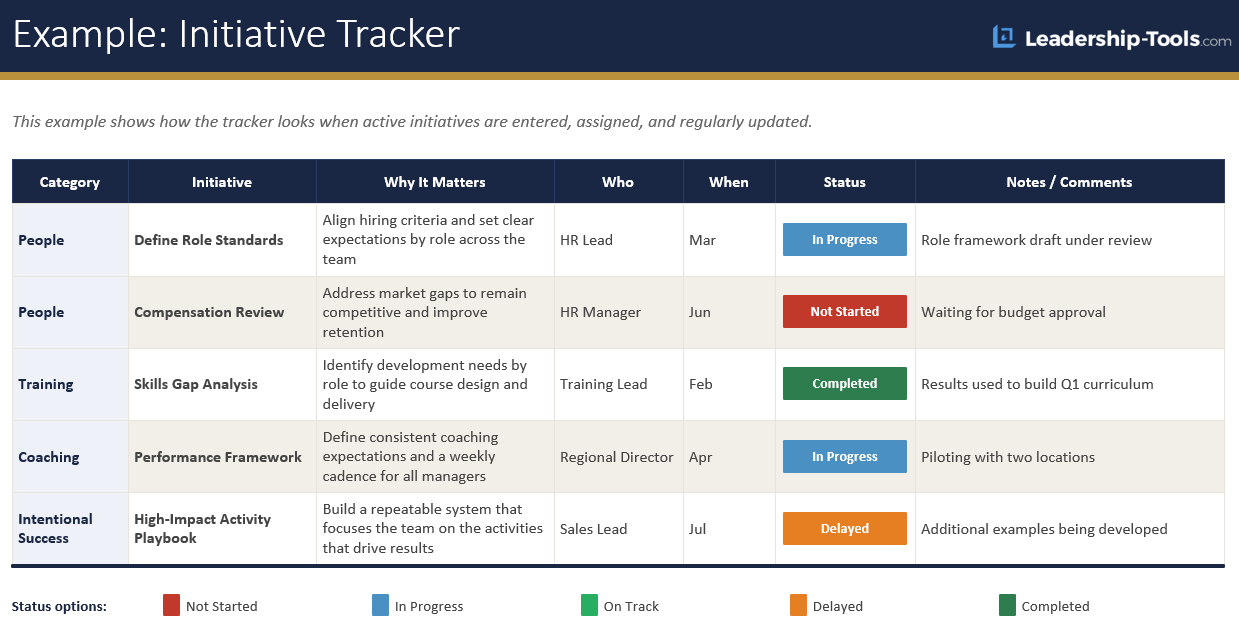
It captures the information that actually matters for keeping work visible, without turning into a complicated spreadsheet that nobody maintains. The goal is a system simple enough to update in five minutes but comprehensive enough to give you a complete picture of all your work in one place.
What the Project Template Captures
Each column in this project task tracker serves a specific purpose, and understanding that purpose helps you use the template more effectively.
Category organizes your initiatives within the six Growth Roadmap pillars:
- People
- Training
- Coaching
- Goals and Results
- Reinforce and Recognize
- Performance Management
Grouping by category makes it easy to see at a glance whether your attention is balanced across the organization or concentrated in one area.
Initiative names the specific project or improvement being tracked. 'Why It Matters' is the column most leaders skip on a first pass and should not. Writing down why an initiative matters keeps the work connected to strategy when daily priorities compete for attention. If you cannot articulate why something matters, that is important to know before resources are committed.
'Who' identifies the single person accountable for the initiative. Not a team, not a department, but a specific individual. When ownership is shared or unclear, accountability disappears. When names the target completion month, which creates a clear finish line and makes scheduling conversations easier.
'Status' gives everyone an honest picture of where things stand. The five options include:
- Not Started
- On Track
- Delayed
- Blocked
- Completed
These cover what most teams need. Keep them consistent so the whole team reads them the same way.
Anytime the status is Delayed or Blocked, that means the leader needs to escalate the issue and work to resolve as quickly as possible. Clear communication to all stakeholders when a project is delayed is critical to mitigate any unintended impacts to others.
'Notes and Comments' is where you capture context that does not fit elsewhere, including what is blocking progress, what decision is pending, or what changed since the last review. It also serves as the place to record your next action for each initiative. A project listed as In Progress with no next action noted tells you very little. Keeping a clear next step in the Notes column for every active initiative is what turns this from a passive status list into an active execution tool.
Setting Up and Maintaining the Tracker
The most common mistake leaders make when setting up a simple project tracker template is trying to add every project at once.
Start with your active projects only, the ones that are currently in motion or starting within the next few weeks. Once the system is in place and the weekly review habit is established, add upcoming projects as they come into view. A lean, current tracker is far more valuable than a comprehensive one that nobody updates.
A weekly review is what keeps this system alive. Fifteen minutes at the start of each week is enough for most leaders. Update statuses, confirm next actions, flag anything that is blocked or at risk, and identify any projects where the next step is unclear. If you run a team meeting, this review can double as the opening five minutes of your standing agenda.
One more thing worth noting: a tracker that is two weeks out of date is worse than no tracker at all. It creates a false sense of visibility. Consistency is what makes the system work.
The Free Project Calendar Template
The project calendar template gives you the time-based view that a tracker alone cannot provide.
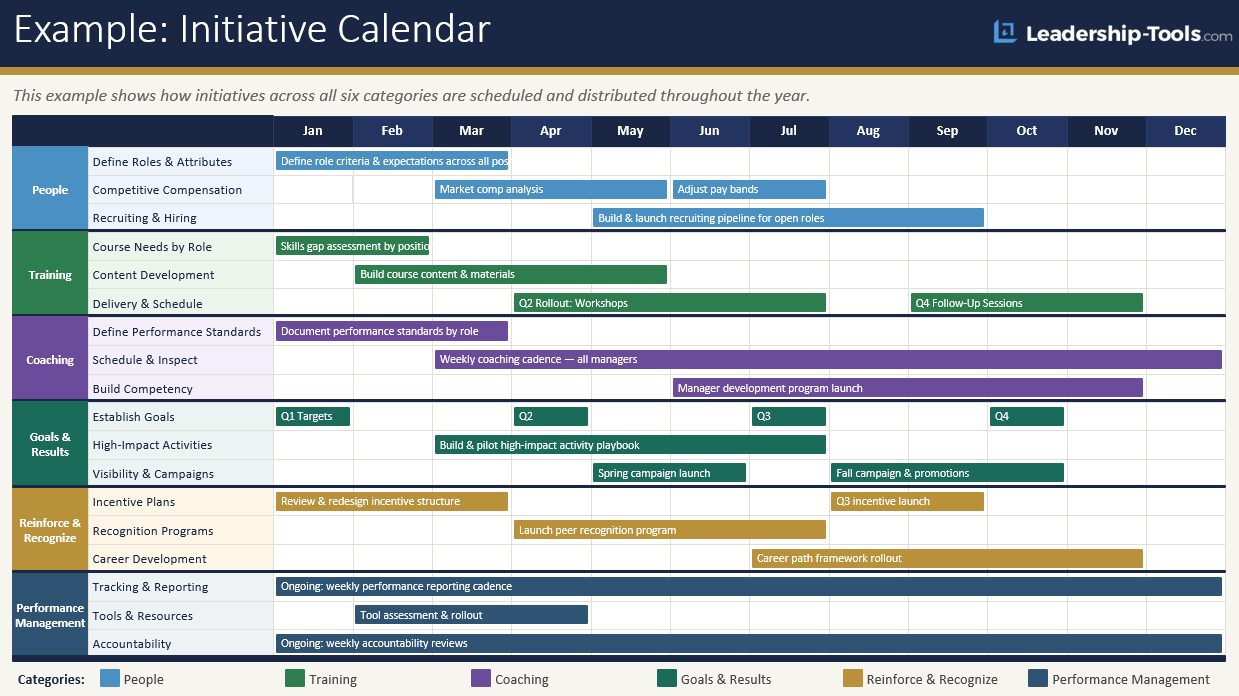
Where the tracker tells you what each project is, who owns it, and where it stands, the calendar shows you when everything is happening and how your work is distributed across the coming weeks and months. The two tools answer different questions, and together they give you the complete picture.
What the Calendar Adds
Without a time-based view, it is easy to miss patterns that create problems before they arrive.
- Multiple deadlines stacking in the same week.
- A period when the team will be managing four active initiatives simultaneously.
- A month where nothing significant is scheduled, followed by a month where everything is due at once.
The project calendar makes those patterns visible when you still have time to adjust them.
It also serves as a planning and communication tool.
When you can show a leader or stakeholder how initiatives are distributed across the year, conversations about priorities become more grounded. You are no longer describing what you plan to do. You are showing them when and how the work is organized.
How the Calendar Is Organized
The project calendar uses the same six Growth Roadmap categories as the tracker, which makes the two tools easy to read side by side.
Each category, People, Training, Coaching, Goals and Results, Reinforce and Recognize, and Performance Management, has three rows for initiatives.
Each initiative gets a bar drawn across the weeks or months when active work is expected. A short label on the bar describes the phase, whether that is Build, Launch, Rollout, Review, or whatever term fits your work.
Keep the entries specific rather than general. A bar labeled "Project A" tells you that work exists. A bar labeled "Project A — Pilot Launch" tells you what that work actually involves, which makes the calendar useful at a glance rather than just decorative.
A Note on Calibration
One of the most valuable things the calendar reveals is overload.
Some overlap across initiatives is normal and manageable. But when you look at your calendar and see six active initiatives running simultaneously in the same month, with several of them entering their most demanding phase, that is a signal worth addressing. The calendar does not solve the overload, but it makes it visible early enough to do something about it.
Use the calendar at the start of a planning cycle to sequence your work deliberately, not just list it.
Look for months where the team is being asked to carry too much, and adjust timelines before commitments are made rather than after expectations have been set.
The Free Weekly Project Update Template
The tracker and calendar keep the work visible to you. The weekly update is what you send to everyone else.
Don't be that leader who handles this with an email written from scratch each Friday. Using the weekly update template, you'll provide clarity on all key aspects of the project for everyone to see. Same fields, same order, every week, which also assists a busy executive in knowing exactly where to look without having to read the entire update.
The form opens with the project name, owner, Growth Roadmap pillar, and week ending date. Below that sits five milestone rows carrying two dates each: an original due date that never changes, and a forecast date that does. That pairing is your honest record of slippage when the project is behind schedule. Then three short blocks covering what moved this week, what happens next week, and what is blocked along with the specific support that would unblock it. The last block is reserved for decisions you need from leadership.
Status uses the same five values as the tracker: Not Started, On Track, Delayed, Off Track, Completed. Choose one from the dropdown and the cell colors itself.

What Makes a Weekly Update Credible
- Send it every week, regardless of status. It's important that all key stakeholders have confidence that the project is being actively managed with timely updates.
- Keep the distribution list stable. Adding additional people during a crisis signals panic. Adding them at the start signals confidence.
- Never let the form replace a conversation. If a project moved to Off Track this week, pick up the phone for one-on-one conversations to ensure a full understanding of any barriers, preferably before sending an update.
The workbook includes four tabs: How to Use, the blank Weekly Update template, a completed Example showing a project that slipped, and a Lists tab holding the drop down values you can edit to match your own wording. Customize the form as you see fit.
Using the Tools Together
When you use your free project tracker template alongside the calendar, the two tools reinforce each other in ways neither accomplishes alone. The weekly update then is used to share timely updates with the people who need to know.
- The tracker is your source of truth. It holds the complete picture of every active project, including who owns it, what phase it is in, and what needs to happen next.
- The calendar is your planning layer. It shows you how that work is distributed across time and where your attention will need to be concentrated in the weeks ahead.
A practical way to connect them is to treat the tracker as the operational view you review weekly and the calendar as the strategic view you review monthly. When a project deadline changes in the tracker, update the calendar to match. When a month on the calendar looks overloaded, review the tracker to identify which projects have flexibility in their timelines.
If you are using the project tracker spreadsheet template in Excel or Google Sheets, a shared workbook gives your team real-time access to both the tracker and the calendar in a single file. That removes the lag between when something changes and when the rest of the team can see it.
Running Your Weekly Review
The weekly review is the engine that keeps this system running, and it does not need to take long.
Set aside fifteen to thirty minutes once a week, ideally at the same time. Work through the tracker and update statuses, confirm that every active project has a clear next action, flag anything that is blocked or at risk, and look ahead two to three weeks on the calendar to confirm that upcoming workload is realistic.
If you are running this review with a team, walk through the tracker together. Confirm who owns what, surface anything that needs attention, and use the calendar to look ahead at the next one to two weeks.
This kind of regular, structured visibility is what keeps teams aligned without requiring constant status updates or lengthy stand-ups.
Once statuses are current and blockers are named, fill in the weekly update as the week progresses and send it on the same day every week. This will teach team members when to expect it to arrive in their inbox.
"Small disciplines repeated with consistency every day lead to great achievements gained slowly over time."
- John C. Maxwell
Keeping the System Current
The biggest risk with any tracking system is that it gets maintained for the first few weeks and then quietly abandoned.
The solution is simplicity. A system that takes thirty seconds to update will be updated. A system that takes thirty minutes will be skipped.
Start with the core columns in the tracker and only add more if you consistently find yourself needing information that is not there. If you have a column that never gets filled in and never gets referenced in your reviews, remove it.
The same principle applies to the calendar. Focus it on the milestones and deadlines that actually matter to your work. A calendar that maps every small task becomes noise, and noise gets ignored.
Color coding is a useful addition once the basics are in place. A simple system, green for on track, yellow for at risk, and red for blocked or overdue, makes it faster to scan the tracker and spot problems without reading every line.
This works especially well in a shared project tracker spreadsheet template where multiple people are looking at the same document.
Keep completed projects on the tracker for a short time before archiving them. Seeing completed work is motivating and gives you a realistic sense of how much your team is actually accomplishing.
After a few weeks, move completed projects to a separate archive tab to keep the active view clean and easy to scan.
Note: Some leaders adapt this free project tracker template into a simple milestone tracker by replacing the Status column with a milestone date column. Others use it as a team project tracker by filtering the Category column by department rather than Growth Roadmap pillar. The structure is flexible enough to support either approach without rebuilding the template from scratch.
What This Tool Does & Doesn't Do
It helps to be clear about what you are getting with this system and what you are not.
"Simplicity is the ultimate sophistication."
— Leonardo da Vinci
What these tools do is give you and your team a shared, reliable view of where work stands, when it is due, and who is responsible. They make status visible without requiring meetings to gather it. They surface problems early rather than after they have already affected a deadline. And they create the kind of consistent documentation that makes it easier to communicate priorities to senior leadership.
What these tools do not do is solve communication problems, replace the judgment that good leadership requires, or make difficult decisions for you. A tracker tells you that a project is delayed. It does not tell you why, what to do about it, or whether the deadline can be moved. That requires a conversation, and the tracker creates the context for that conversation to happen more productively.
They also do not require any particular software. The project tracker excel template and Google Sheets versions work equally well depending on how your team already operates. The structure is what matters, not the platform.
A Final Thought
The leaders who get the most from our free project tracker template are not the ones who set it up properly and make it a source of truth for their team. They are the ones who start using it and keep using it.
Download one or both templates, open the tracker, and add your five most active projects today. Schedule a fifteen-minute review for the same time next week. Run it twice, and you will already have more visibility than most leaders carry into a typical week.
The system earns your trust through use, not setup.
Download your free project tracker template today, set it up in the format your team already uses, and run your first review this week. Start simple, keep it current, and add complexity only if you find yourself genuinely needing it. A simple project tracker template that gets used every week will always outperform a sophisticated one that gets opened once and forgotten.
Frequently Asked Questions (FAQ)
These are some of the most common questions leaders have when working to effectively track key project and initiatives that are key to driving growth and efficiency for the organization.
Click on the (+) sign below to expand each question. Click the (-) sign to collapse it again.
What is a free project tracker template?
What is the difference between a project tracker and a project task tracker template?
A project task tracker template captures the detail of each individual project, including what it is, who owns it, its current status, and the specific next action required to keep it moving. A project tracker at the portfolio level shows all active work in one view. The template on this page combines both functions, giving you task-level detail within a full project overview.
What is the difference between the project tracker and the project calendar?
The tracker gives you the detail view, capturing what each project is, who owns it, and where it stands right now. The calendar gives you the time view, showing when everything is happening and how your work is distributed across the coming months. Both tools answer different questions, and using them together provides a complete picture of your execution.
Do I need both tools or just one?
You can use either tool on its own and get value from it. The tracker works well as a standalone status tool. The calendar works well as a standalone planning and communication tool. The combination is where the system becomes genuinely powerful, especially for leaders managing multiple initiatives across different categories at the same time.
What format should I use?
Use whatever tool your team is already working in. The project tracker excel template works well when you keep the file locally and want the dropdowns and color coding to behave exactly as built. Google Sheets is the better choice when several people need to view or update the same document, or when you want the tracker visible to your team without emailing versions around. The PDF is there for anyone who prefers to print a blank form and fill it in by hand.
How often should I update the tracker and calendar?
The tracker works best when reviewed and updated weekly. The calendar works best when reviewed monthly or at the start of each planning cycle. A weekly review of both together, even just fifteen minutes, is enough to keep the system current and useful.
Is a simple project tracker template enough for a large team?
Yes, for most team leaders managing five to twenty people, a simple project tracker template provides everything you need. Complexity does not improve execution. Consistency does. Start with the core structure on this page and add to it only when you identify a genuine gap.
Are these templates free?
Yes. The project tracker, the project calendar, and the weekly project update template are all available at no cost in PDF, Excel, and Google Sheets. No sign-up is required to download any of them.
Can I customize the templates?
Yes. The templates are designed to be adapted to suit your specific needs. You can add or remove columns in the tracker, adjust the category labels in the calendar, and modify the content to reflect your team's specific language and priorities. The structure provides the starting point. You refine it to fit your situation.
What is a weekly project update report?
A weekly project update report is a one-page summary you send to stakeholders each week showing where a project stands, what moved, what happens next, and what is blocked. The tracker and calendar keep the work visible to you. The update report is what you send to everyone else. It uses the same five status values as the tracker.
Do I need the weekly update if I already share the tracker?
Sharing a tracker asks the reader to scan every row and work out what changed since last week. A weekly update tells them directly what has changed and how the project is progressing. It also gives you a dedicated place to name the decisions you need from leadership. Weekly updates are critical for leaders who are responsible for delivering results on time and to help inform their own updates to their leader.
Download Free Project Tracker, Calendar, & Weekly Update Templates

Project Tracker Template:
Project Calendar Template:
Weekly Project Update Template:
Want the entire leadership tools library? Subscribe to our free newsletter and we'll send you a link to every tool on this site, all on one page, sorted by leadership phase. Every tool is free to download on its own page. The library just puts them in one place. Plus, you'll never miss out on updated or new tool announcements.
Your privacy is important to us. We never share or sell email addresses.
Leadership Tools Newsletter
Subscribe Free - See All Tools on One Page - Get New Tool Alerts
More Leadership Tools for Managing Your Team




Contact Information:
phone
(503) 970-9777
Email Customer Service
helpsupport@leadership-tools.com
Email Richard
richard@leadership-tools.com

By Richard Gorham
Leadership-Tools.com
2879 Riverwalk Loop, Eugene, Oregon, 97401
Copyright (c) 2002 - 2026 All Rights Reserved