Yes. In fact, it's often more useful remotely because you have fewer casual chances to learn preferences. Keep it simple, digital, and easy to update.
- Home
- Leading People
- My Favorite Things Recognition Tool
Employee Favorite Things Template (My Favorite Things Recognition Tool)
If you’ve ever guessed at a “meaningful” reward and missed the mark, you’re not alone. Most recognition fails for one simple reason: it’s not personal. This employee favorite things template gives you an easy, respectful way to learn what each team member enjoys, so you can recognize effort in a way that feels genuine, not awkward.
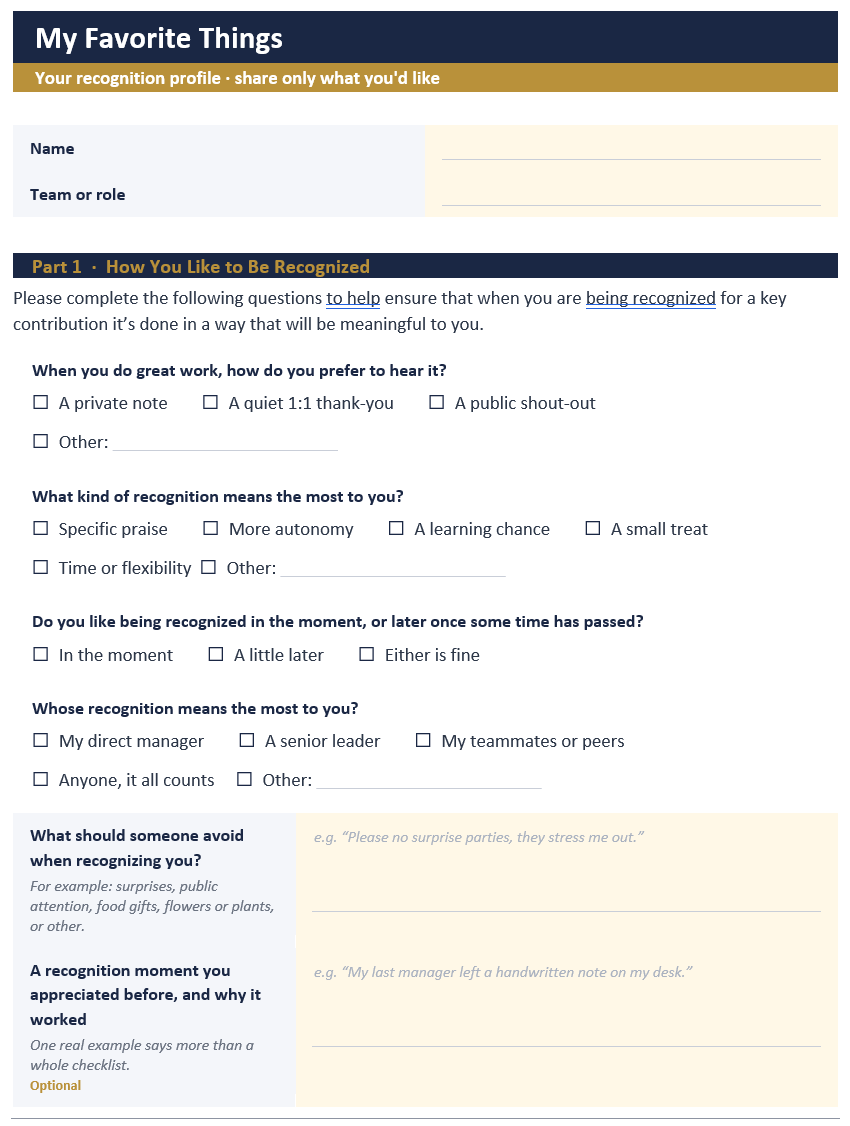
My Favorite Things is a two-part recognition system. The first part is a short preferences form, one per person, that captures how someone likes to be recognized, the small rewards they value, and what to avoid. The second part is a team tracker, a spreadsheet with one row per person, so you can see everyone at a glance and log who you last thanked. The form tells you how to recognize each person. The tracker keeps you from overlooking anyone.
Great leaders understand the energizing power of positive reinforcement. They know it's in everyone's best interest to support and nurture a healthy work environment where everyone feels valued for the work they do. Afterall, everyone likes to be recognized as someone who adds value to the team and know they are considered to be a key contributor, right?
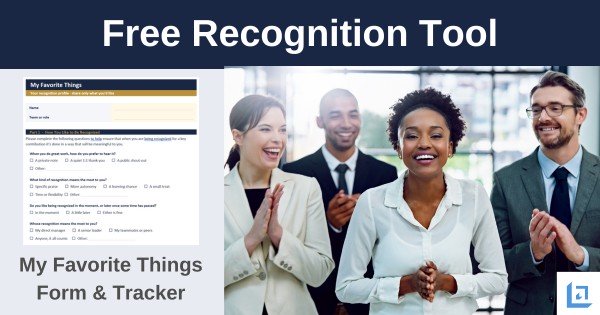
Our free My Favorite Things template takes the guesswork out of gift giving for employee recognition.
My Favorite Things Recognition Form:
My Favorite Things Team Tracker:
Download the employee favorite things template and use it as-is, or customize it for your team
Jump To: Quick Version | Overview (What This Tool Is) | Who This Is For | Why It Works (and When It Doesn't) | What's Included in the Template |How to Use It (Step-by-Step) | Gift Guide Ideas (by Budget) | Why Cash Is Not the Best Choice |Examples of Recognition Messages | Common Pitfalls | FAQ | Get Updates Free | Download Free Tool
Copy/Paste: Employee Favorite Things Questionnaire (Instant Template)
If you need an employee favorite things template you can use right now, copy and paste the questions below into an email, Google Doc, Microsoft Word document, Slack/Teams message, or your HR system. This is the fastest way to create an employee favorites questionnaire without waiting for a download.
A quick note for leaders and HR: keep this optional, keep it work-appropriate, and let people skip anything they don’t want to answer.
Quick Version (10 questions, best for busy teams)

- Name:
- Birthday (optional):
- How do you prefer to be recognized? (Examples: private message, public shout-out, written note, 1:1 conversation)
- What kind of recognition feels most meaningful to you? Examples: specific praise, extra autonomy, learning opportunity, small treat, time flexibility)
- Favorite snack(s) (or “no food gifts”):
- Favorite drink (coffee/tea/soda/other) (optional):
- Any dietary restrictions or allergies to be aware of? (optional / “prefer not to say”):
- Favorite small, low-cost treat or pick-me-up: (Examples: chocolate, trail mix, bookstore, music, fresh flowers, office supplies)
- Favorite restaurant/coffee shop (or delivery spot) (optional):
- What should I avoid when recognizing you? (Examples: surprises, public attention, food gifts, certain types of humor)
Expanded Version (adds smart options without being intrusive)
11) Do you prefer recognition in the moment, or later after things calm down?
12) Are you more motivated by: A) appreciation words, B) time/flexibility, C) learning/growth, D) small gifts, E) public status/visibility
13) What’s a recognition moment you appreciated in the past, and why did it land well?
14) Favorite hobby or interest you enjoy outside work (optional):
15) If we ever do team swag/apparel, do you want to share a size? (optional / “prefer not to say”)
16) If you work remotely and we ever mail something, do you want to provide a shipping address? (optional)
17) Anything you want your manager/team to know about what “good recognition” looks like for you?
One-Minute Intro Script (use this when you send to your team)
“Hey team, quick request. (Consider this optional) I’m using this employee favorite things list to make recognition more personal and to avoid guessing. Please share only what you’re comfortable sharing. You can skip any question and update your answers anytime.”
Overview (What This Tool Is)
You don’t need a bigger rewards budget to improve morale. You need better aim. The “My Favorite Things” employee recognition tool is a short preferences form (digital or paper) that helps you learn how each person likes to be recognized, what small rewards they will value, and what to avoid. A recognition tracker tool is also provided so you can log each recognition event and ensure you aren't overlooking employees who are deserving but work a bit quieter than their peers.
""Every leader is given 86,400 seconds in a day. Have you used one today to say thank you?"
In simple terms, it turns recognition from guessing into knowing. It also prevents the classic misfires, like buying food gifts for someone with dietary restrictions, giving public praise to someone who hates the spotlight, or choosing a “treat” that feels tone-deaf.
This is a low-effort, high-impact exercise. It helps you recognize people more personally without creating a complicated program you won’t maintain. If you want a recognition approach that feels human and consistent, this employee favorite things template gives you a clean starting point and a repeatable resource.
Who This Is For (And How It Fits Your Team)
If you’re a new manager, the employee favorite things template helps you learn preferences fast without guessing. It’s especially useful in small teams where you’re wearing multiple hats, and in remote or hybrid teams where you have fewer informal moments to learn what people like.
Common Use Cases
- New managers who want a simple way to build trust early
- Team leads who want fewer awkward recognition moments
- Solopreneurs and small-business owners who want lightweight systems
- HR and L&D teams that want a ready-to-use workshop or onboarding tool
- Leadership coaches who want a practical between-session assignment
When To Be Careful
If your culture has low trust right now, employees may worry the information will be used to judge them. In that case, you can still use the tool, but you’ll want to roll it out with extra clarity (We'll explain in the following section).
If you’re aiming to properly recognize employees in a way that’s fair, consistent, and not dependent on mind-reading, this employee favorite things template is the perfect resource. It gives you a simple way to learn what "thoughtful" means to each person, so your appreciation lands more often and feels less random.
You can use it whether you manage two people or twenty, whether you’re in the same office or spread across time zones. The result is a recognition process you can lean on to avoid any misfires with team members.
Why It Works (And When It Doesn’t)
Recognition lands especially well with the recipient when it feels intentional and personal. Most people don't need a big, flashy "reward" to feel valued, and they don't expect you to spend a ton of money. They mostly need to feel seen and valued. That means you notice what they did, you name it in plain words, and you deliver appreciation in a way they can receive.
That’s where recognition often breaks down. Leaders are busy, teams are diverse, and what feels motivating to you may feel awkward, annoying, or even stressful to someone else. One person loves a public shout-out. Another would rather melt into the floor rather than have a spotlight turned on them. Some people want a handwritten note. Others want time, flexibility, or a chance to learn something new.
The My Favorite Things questionnaire supports better recognition by making preferences visible. It turns “I hope this lands well” into “I’m pretty sure this will go over well.” And it does it without creating a complicated program you’ll abandon in three weeks.
It’s not magic, though. Like any tool, it works best when it’s used with common sense and good intent. With the employee favorite things template, you’re building a small system that makes recognition easier to repeat.
Next, let's walk through three ways it helps, and a few situations where you’ll want to adjust your approach, so your efforts are perceived as fair, respectful, and motivating.
First, it reduces friction for you
When you know someone’s preferences, it’s easier to act. You spend less energy planning and more energy leading.
Second, it increases the chance your recognition is received well
The same “reward” can feel thoughtful to one person and uncomfortable to another. Preferences help you match the moment.
Third, it supports inclusion
Not everyone is comfortable speaking up about what they want. A simple form creates a quieter path to being seen, especially for more reserved team members.
Where This Approach Can Fail
- It becomes a “one-and-done” form that gets filed away and forgotten or never used.
- It turns into a shopping list, rather than a guide to thoughtful recognition.
- It’s used only for “top performers,” which can unintentionally discourage steady contributors.
- It feels intrusive if you ask for overly personal details.
Used with care, this employee favorite things template provides you recognition ideas that are sure to hit the mark with your team members.
What’s Included in the Employee Favorite Things Template
Let’s break down what the template should collect, and why. You can keep it short. The goal is “useful,” not “exhaustive.”
Identify Recognition Preferences (the most important part)
- This is about how people like to receive appreciation.
- Do you prefer public recognition, private recognition, or either?
- What kind of feedback feels most motivating for you (specific praise, progress updates, written note, quick shout-out)?
- What’s one recognition moment you’ve appreciated in the past? Why? What made it special?
Small Rewards and “Personal Favorites”
- This is where the “my favorite things list for employees” idea lives.
- Favorite snack or drink (and anything to avoid)
- Favorite coffee or tea order (optional)
- A few low-cost treats they enjoy (book, playlist time, extra break, choose-a-project)
- Favorite local spot or delivery choice (optional)
Practical Constraints (to prevent misfires)
- Dietary restrictions or allergies (optional, and always allow for “prefer not to say”)
- Sizes only if your team regularly does apparel, and only if the person chooses to share
- Shipping address only if you will send items, and only with clear privacy handling
Non-Monetary Recognition Ideas
- Many people value time and autonomy more than stuff.
- Time-off preferences (early finish, flex hours)
- Learning preferences (course, conference, book budget)
- Stretch opportunities they’d enjoy (presenting, mentoring, leading a small project)
Plus a Team Tracker (the companion tool)
The form is completed for each employee and handed in to the supervisor. The tracker works to help identify opportunities and gaps for recognition across your whole team. It is a simple spreadsheet, Excel or Google Sheets, with one row per person and a running log of each time you recognize someone. A dashboard tab totals recognitions per person over a window you choose and flags anyone you have not thanked in a while.
The reason this matters is fairness. It is easy to keep circling back to the same few people you talk to most, while a steady contributor goes a quarter without a word. The tracker makes that visible. If Priya has not been recognized since the spring audit, you will see it. Set your team members up on the tracker once from their completed forms, then fill in a row whenever you recognize someone.
A good template focuses on recognition style, a few practical favorites, and clear boundaries. That’s enough to be useful without getting personal. It gives you the information you need to act, without turning the form into a “tell me everything about your life” document that feels intrusive or awkward.
It also keeps the tool easy to maintain. When the template is short and respectful, people are more likely to complete it, update it, and trust how it’s being used. And when you’re not drowning in unnecessary details, you can scan it quickly before a 1:1, a project wrap-up, a tough week, or a milestone.
Most importantly, this balanced approach protects the spirit of recognition. The goal is to express your appreciation and to recognize team members' efforts in a successful way and to do so consistently. Our employee favorite things template helps you do that in a way that fits different personalities, budgets, and team cultures.
"There is not a more pleasing exercise of the mind than gratitude. It is accompanied with such an inward satisfaction that the duty is sufficiently rewarded by the performance."
- Joseph Addison
How To Use the Employee Recognition Template (Step-By-Step)
Here’s a simple rollout process that works for most teams, small businesses, growing departments, and remote/hybrid groups. You can set everything up in under an hour, then keep it running with small, steady follow-through that doesn’t create extra admin work.

The goal is not to build a complex recognition program you have to manage. The goal is to collect preferences once (using an employee favorites questionnaire), store them safely, and use them in simple, repeatable ways that make people feel appreciated for their efforts.
Two quick guardrails keep this easy and effective: keep participation optional and keep the questions work appropriate.
You’re not trying to gather sensitive personal information, just the small details that prevent well-meant recognition from missing the mark (for example, “no food gifts,” “prefer private thanks,” or “avoid surprises”).
The process below gives you step-by-step guidance for launching the employee favorite things template with your team in a way that’s quick, respectful, and easy to sustain.
Step 1: Set Expectations in One Minute
Use language like:
- “We’re doing this to make recognition more personal and take "guessing" out of the process. Share only what you’re comfortable sharing. This is optional, and you can update it anytime.”
That one script does a lot. It reduces skepticism and increases participation.
Step 2: Share the Form and Give a Short Deadline
Give people a few days, not a few hours. If you want higher response rates, send one reminder and then stop. No guilt.
Step 3: Store the Forms, and Set Up the Tracker
Keep all completed forms somewhere private, then set up your team on the My Favorite Things Tracker so you have one view of everyone.
Transfer data provided on the form by each employee to the tracker.
Make filling out the form a regular part of onboarding, with the employee’s consent.
Step 4: Build Recognition into Your Routine
Simple triggers help:
- Before 1:1s, scan the person’s recognition preferences
- Before performance conversations, plan one specific appreciation statement
- At milestones (90 days, project close, busy season), choose one “favorite things” action
Step 5: Use it Fairly and Consistently
Recognition is not just for the loudest people or the easiest relationships. Use the tool to widen your attention.
Aim for:
- Specific behavior you’re recognizing
- A small, personal touch based on preferences
- A cadence that feels consistent across the team
In conclusion, the employee favorite things template works when it becomes a simple system you repeat. Collect the info once, then use it in small ways, often. Your team will appreciate being asked for their input and your proactive efforts to recognize their contributions.
Oh, and as a reminder, don't forget that you can also use our free Leadership Ecard system for quick and easy employee recognition.
Gift Guide Mapping: Turn Favorites into Recognition Ideas (By Budget)

Collecting an employee favorite things questionnaire is only step one. The real payoff is using the answers to deliver small, personal moments of appreciation that feel thoughtful (without turning recognition into a shopping spree).
Below is a simple map from answers to gift ideas that you can use right away. It works for office teams, remote teams, and managers with a limited recognition budget. It can be difficult sometimes to match the reward with the value of the contribution. This gift-mapping approach will help you choose a reward that fits.
It can be difficult sometimes to match the reward with the value of the contribution. This gift-mapping approach will help you choose a reward that fits.
Step 1: Start with the Recognition Style (not the item)
Before you pick a gift from a completed employee favorite things template, check their preference:
- If they prefer private recognition: send a direct message or a 1:1 note first, then add a small “favorite thing” as a bonus.
- If they like public recognition: give a team shout-out that names the specific contribution, then add a small preference-based touch.
- If they value time/autonomy: choose a time/flexibility reward first; gifts are optional.
Step 2: Use This Budget Map (choose one idea that fits the person)
Under $10 (easy, frequent, and sustainable)
- Favorite snack/drink: a single item they named (or “no food” alternative)
- A small “upgrade” item tied to their preferences (nice pen, sticky notes, specialty tea)
- A song/playlist + a genuine thank-you note for a specific win (free + personal)
- “Choice token”: they pick the next team icebreaker, team playlist, or meeting theme (cost: $0)
- Time-based: end the day 30 minutes early after a tough push (cost: $0)
$10–$25 (milestones, project closes, tough weeks)
- Coffee shop gift card to their favorite place
- Lunch/delivery credit to their preferred restaurant
- Book related to their interest (or a professional skill they want to build)
- Hobby mini-item (example: board-game expansion, puzzle, craft supplies) if they listed hobbies
- Remote-friendly: e-gift card + message that names impact and effort
$25–$50 (bigger milestones, retention moments, “above and beyond”)
- Learning-focused: course credit, book bundle, or a paid workshop they’d enjoy
- Experience-based: movie tickets, local experience voucher (only if you know they’ll like it)
- “Time + support”: a half-day flex plus coverage help to make it real
- Team contribution reward: let them choose a small tool/resource that makes their work easier (mouse, headset stand, desk light)
Step 3: Common Answers and What They Usually Mean (fast interpretation)
If someone chooses “public recognition”
They may value visibility, appreciation in front of peers, and social reinforcement.
Good match: public shout-out + a small preference-based touch.
If someone chooses “private recognition”
They may value sincerity without spotlight.
Good match: 1:1 thank you message + small, quiet treat (or no gift at all).
If someone chooses “time/flexibility”
They likely value autonomy and reduced stress more than objects.
Good match: early finish, late start, meeting-free block, or choice over next assignment.
If someone lists “no food gifts” or gives dietary restrictions
They’re helping you avoid an awkward misfire.
Good match: coffee shop gift card (if OK), bookstore, learning credit, time reward, handwritten note.
Step 4: The “Leader’s Rule” (keeps this from becoming a shopping list)
Lead with the message, not the merchandise:
- Name the specific behavior
- Name the impact
- Add the preference-based touch only if it fits and feels fair
Example:
"Sam, thanks for how you handled that customer escalation. Your calm response protected the relationship and kept the team focused. I know you'd rather hear it one-on-one than at standup, so I'm telling you here. I also grabbed your usual coffee on the way in."
Why Cash Is Not Always the Best Reward
Cash has always been a nice incentive, but it’s not always the best choice when making smaller "on-the-spot" type of rewards. Why not? Because it's too quick and easy. The employee knows that it takes very little effort or forethought on your part to write a check for cash.
 "I appreciate all your hard work. Thanks for a job well done!"
Oh, they'll accept the cash, no question about it. But leaders should consider the overall impact and what happens after the money is spent. The cash usually goes to pay bills or spent on some other consumable item.
Shortly thereafter, the employee has nothing in front of them to remind them daily of their achievement.
On the other hand, if you use our My Favorite Things tool, you will be able to recognize employees more often. That stretches a limited recognition budget further. Employees can receive multiple awards through the year with gifts they're guaranteed to value, because they chose them.
The employee will always remember that you cared enough to take the time to reward them with something that is special to them.
Examples You Can Copy (Recognition Messages That Feel Personal)
You don't need grand gestures. Most people aren't looking for a "big reward." They're looking for a moment that says, in plain words, "I noticed what you did, and it mattered."
This is where the My Favorite Things tool becomes practical. It gives you small details that help you choose a recognition approach that fits the person. Not what you think is meaningful, but what you know they will appreciate.
The examples below are designed for real life. Busy weeks, tight budgets, remote teams, mixed personalities, and the everyday wins that keep work moving. Use them as written, or treat them like templates. Swap in the behavior you want to reinforce, match the delivery style to the person (public or private, written or verbal), and add a small preference-based touch only when it makes sense.
One quick rule as you read: lead with the impact, not the item. The “favorite thing” is a thoughtful extra. The recognition is the authentic message delivered by you.
Example: Private Recognition (prefers low spotlight)
"I noticed how you stayed calm and solution-focused on that outage call. That steadiness helped the whole team. Thank you. I know you'd rather hear it quietly than at a team meeting, so I'm telling you here. I also dropped a used-bookstore gift card in your bag, since you told me you enjoy reading so much."
Example: Public Recognition (enjoys group praise)
"I want to call out Dana in front of the team for the new rollout plan she pulled together. It saved us time and cut errors across the board. Great work, Dana. And since you've been wanting to get to that industry conference, the seat is yours. You've earned it."
Example: Non-Monetary Recognition (values time)
"You carried a heavy load this week and still delivered high-quality work. Thank you. Head out early this Friday, and if you'd be willing, I'd like to talk to you about another project I'd like you to lead."
Example: Remote Team Recognition (simple but real)
Quick message plus a small preference-based touch:
"I saw how you walked the new hire through the rollout this week. That mattered more than you know. I sent a coffee gift card your way as a small thanks. I appreciate your efforts."
The common thread is simple: name the behavior, connect it to impact, then match the recognition to the person.
Common Pitfalls (And How to Avoid Them)
This employee favorite things template is simple to implement, which is exactly why it works. But "simple" can also make it easy to misuse without meaning to. Most recognition problems are not caused by bad intent. They come from rushing the rollout, unclear boundaries, or treating the form like a shortcut to motivation instead of support for thoughtful leadership.
The good news is the pitfalls are predictable and fixable. If you keep recognition tied to real contributions, use the preferences as guidance (not a shopping list), and stay consistent and fair across the team, the tool will feel personal instead of awkward. The sections below highlight the most common issues leaders run into and the practical adjustments that keep your recognition meaningful and sustainable.
Pitfall: It turns into a shopping list, rather than a prompt for thoughtful recognition.
Fix: Position it as “preferences for meaningful recognition,” not “what you want me to buy.” Treat the employee favorite things template as guidance, not a shopping list, and your recognition will stay authentic.
Pitfall: Asking for information that feels too personal
Fix: Keep questions work-appropriate. Add “optional” and “prefer not to say” options.
Pitfall: Using the tool only for “top performers”
Fix: Use it to collect recognition ideas for everyone on your team. Over time, notice steady contributors, quiet helpers, and behind-the-scenes work. Recognition is a culture tool, not a contest prize.
Pitfall: Creating inequity with rewards
Fix: Keep monetary items modest and consistent. Lean into low-cost, high-thought actions (time, autonomy, learning, specific praise).
Pitfall: Collecting the form and never using it
Fix: Put a recurring reminder on your calendar before 1:1s or monthly check-ins: “Employee Recognition Opportunities: Scan favorite things forms.”
A few guardrails keep the tool motivating, fair, and easy to sustain. Just as important, guardrails make the system repeatable for you. They reduce decision fatigue because you’re not reinventing recognition every time, and they help you stay aligned with your culture and budget.
Over time, that consistency builds trust. People don’t just remember one nice moment. They come to expect a team environment where effort is noticed, and appreciation is delivered in a way that fits the person.
Frequently Asked Questions (FAQ)
Leaders usually ask a few practical questions before rolling out this employee favorite things template for team members to complete. Here are clear answers you can share.
Click on the (+) sign below to expand each question. Click the (-) sign to collapse it again.
Is this tool appropriate for remote teams?
How often should employees update their favorite things?
Twice a year is plenty, or anytime something changes. A quick "Anything you want to update?" check-in mid-year or during an annual review works well.
What if someone doesn't want to fill it out?
That's okay. Don't pressure them. You can still recognize them using observation and good 1:1 conversations, and they may opt in later when trust grows.
Should I include sensitive details like home address or clothing size?
Only if it's truly needed, and only with consent. For most teams, you can avoid both. If you do collect it, be explicit about privacy and storage.
What's the difference between this and a recognition program?
A recognition program is a broad system with budgets and rules. My Favorite Things is lighter: a form that captures each person's preferences, and a tracker that keeps your recognition even across the team. It can feed a bigger program, but it doesn't need one to be useful.
What's the difference between the form and the tracker?
The form is for one person. Each teammate fills one out, and it tells you how they like to be recognized. The tracker is for the whole team. It's a spreadsheet with one row per person and a log of every recognition, so you can see at a glance who you've thanked recently and who's been overlooked. Use the form to make recognition personal, and the tracker to keep it fair.
How do I keep recognition fair across a whole team?
This is what the tracker is for. Log each recognition as it happens, and the dashboard totals them per person over the window you choose, then flags anyone you haven't recognized in a while. It's easy to keep circling the same few people without noticing; a quiet, steady contributor can go a full quarter without a word. The tracker puts that in front of you so you can act before it becomes a pattern.
Download My Favorite Things Tools
My Favorite Things Recognition Form:
My Favorite Things Team Tracker:
Want the entire leadership tools library? Subscribe to our free newsletter and we'll send you a link to every tool on this site, all on one page, sorted by leadership phase. Every tool is free to download on its own page. The library just puts them in one place. Plus, you'll never miss out on updated or new tool announcements.
Your privacy is important to us. We never share or sell email addresses.
Leadership Tools Newsletter
Subscribe Free - See All Tools on One Page - Get New Tool Alerts
More Leadership Tools for Managing Your Team



Contact Information:
phone
(503) 970-9777
Email Customer Service
helpsupport@leadership-tools.com
Email Richard
richard@leadership-tools.com

By Richard Gorham
Leadership-Tools.com
2879 Riverwalk Loop, Eugene, Oregon, 97401
Copyright (c) 2002 - 2026 All Rights Reserved