At a minimum, a cash flow projection, an income statement, and a balance sheet, along with your startup costs and how you're funding them. Lenders also look for your break-even point and the assumptions behind your numbers. The Business Plan Financials Workbook builds all three statements from three input tabs and calculates your break-even for you.
- Home
- Leading Teams
- Business Plan Template
- Business Plan Financials
Business Plan Financials: Free Financial Projections Workbook (Excel, Sheets, PDF)
The Business Plan Financials Workbook turns three sets of numbers you most likely already know into the financial statements a lender expects to see.
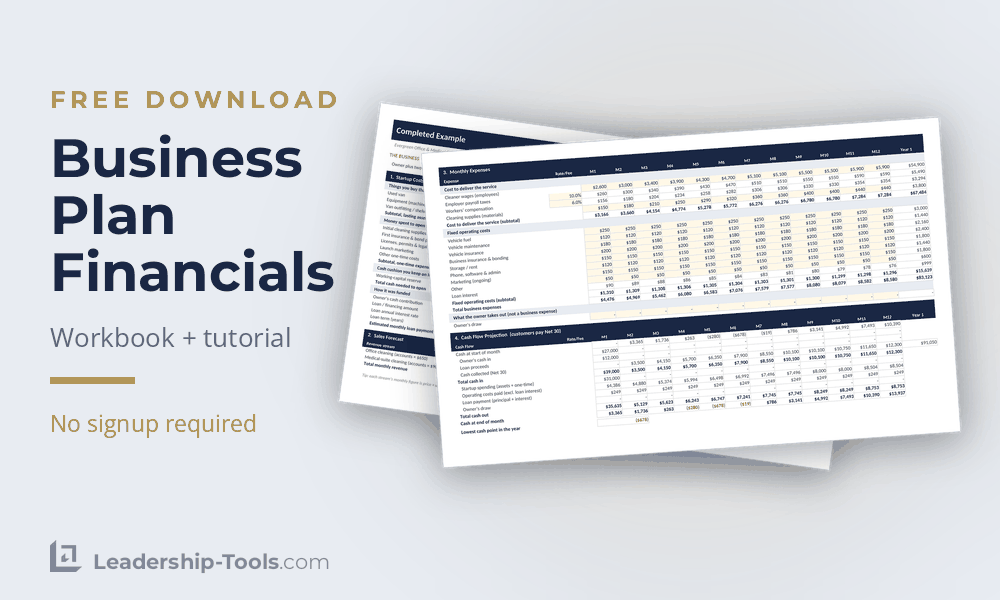
Most owners can tell you roughly what it'll cost to open the doors and approximately how much they intend to sell in the first year. Far fewer can tell you which month the bank balance dips below zero, and that's definitely one key number a loan officer wants to make sure you understand and are prepared for when cash is tight. The workbook helps you to identify that information and calls it out plainly.
In short, you'll fill in three tabs: what it costs to open, what you expect to sell each month, and what it costs to keep the doors open once they are. Everything after that builds itself. Yes, that's an oversimplification, but don't worry, we'll walk you through the entire process.
A quick-start tutorial comes with the workbook, and it walks you through how a two-person cleaning business completes every field, from the first dollar of startup cash to the last month of the year. Read it alongside the workbook and you'll know what belongs in each cell before you start entering your own business numbers.
Download Free Business Plan Financials Workbook
Download Free Workbook Tutorial
Jump To: What It Does | The Five Answers | Startup Costs | Sales Forecast | Monthly Expenses | Your Assumptions | The Three Statements | A Worked Example | How to Use It | Common Mistakes | The Full Toolkit | FAQ | Download
Three Tabs In, Three Statements Out
The workbook has nine tabs, but you'll only need to complete three of the nine. The workbook does the rest for you.
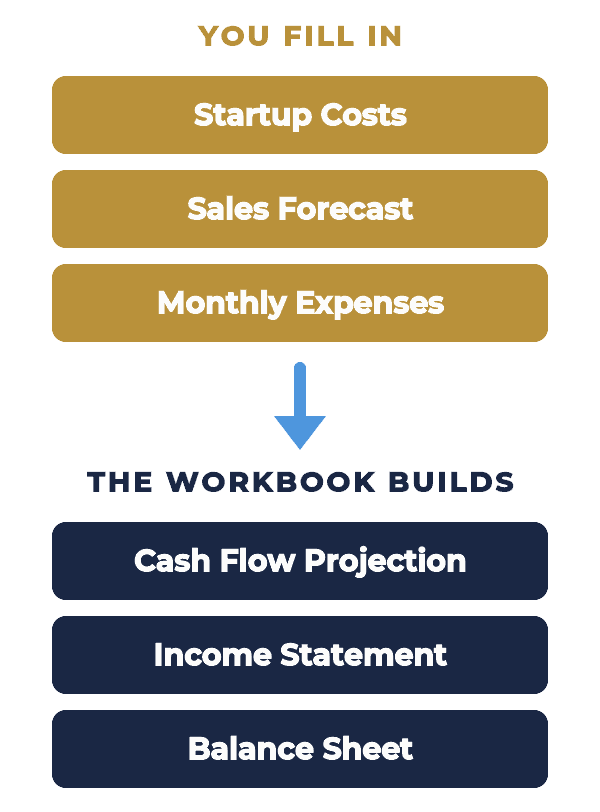
- Start Here: provides some brief instructions and shows you the various responses that are built into the workbook. The responses you get will depend on the numbers you enter in the next three tabs.
- 1. Startup costs: identifies how much money it's going to take to open the business. These are one-time costs, not monthly expenses.
- 2. Sales forecast: where every revenue stream gets its own line across twelve months.
- 3. Monthly expenses: for recording everything it costs to keep running once you've opened the doors.
- Cash Flow Projection: built automatically based on numbers entered in tabs labeled 1, 2, and 3.
- Income Statement: built automatically based on numbers entered in tabs labeled 1, 2, and 3.
- Balance Sheet: built automatically based on numbers entered in tabs labeled 1, 2, and 3.
- Completed Example: shows how Evergreen Office & Medical Cleaning, a two-person startup business, completed this entire workbook.
- Settings: This tab is hidden and supplies the workbook with various data points that enable the workbook to automatically generate the financial statements and provide key insights about your business plan.
Special notes:
- Some cells are protected to ensure formulas are not disrupted. However, if you are an Excel expert and wish to customize anything in the workbook, it's easy for you to unprotect the worksheet. Customize as you see fit.
- One color rule runs through the whole workbook. Cream-colored cells are yours to fill in, and everything else calculates on its own.
Five Questions the Workbook Answers For You
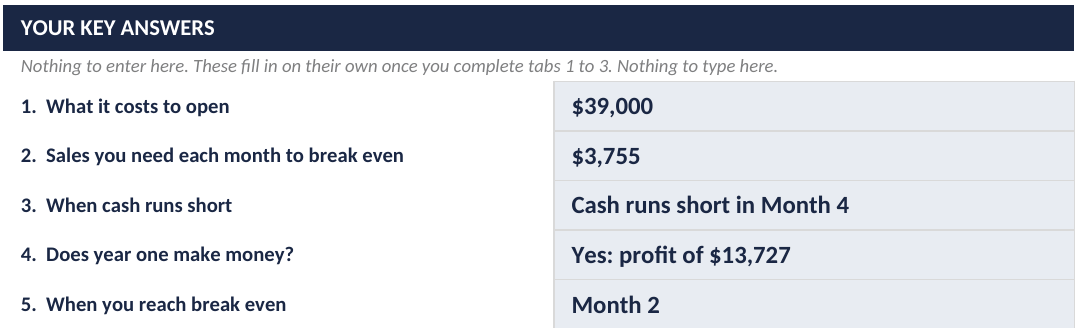
Open the Start Here tab and you'll find a panel called Your Key Answers. It sits empty until the three input tabs are completed, and then five lines fill in on their own. This information provides a prospective lender the answers to key questions about your business plan.
The first is what it costs to open, which adds up all of your one-time purchases to get the business up and running, and whatever cash you hold back as a cushion. For Evergreen that came to $39,000, and roughly a fifth of it was reserve money the owner hoped she wouldn't have to spend, but it is there if necessary.
The second is the sales figure you need each month to break even, meaning the point where revenue covers both the cost of doing the work and keeping the business open. Anything below that line is being funded out of your savings, so it's important to know these numbers before you open rather than be surprised later on.
Third is when cash runs short. The workbook finds your lowest cash balance month and tells you whether the balance drops below zero. This is the moment your cash reserve will come into play to get you through any shortfall.
Fourth is whether year one makes money, pulled straight from the income statement.
And fifth is the month you reach break-even, which gives you some idea how long you'll be living off that reserve.
Below the answers panel sits a second one called What Your Numbers Are Telling You, and it writes a few plain sentences about what it sees. If labor and payroll taxes are eating an unusual share of your revenue, it says so. If your lowest cash month goes negative, it names the month.
Tab 1 Startup Costs: What It Costs to Open the Business
The first tab splits your opening costs into three groups, and how you split them matters.
Group 1: Anything you buy that lasts for an extended period of time goes in the first block. A van, equipment, furniture, computers, etc. These end up as assets on your balance sheet rather than expenses, which is why they're kept separate from everything else. In the example, Evergreen entered a van, cleaning machines and van shelving, which came to $24,500.
Group 2: The second block is money you spend to open and never see again: opening inventory, deposits on rent and utilities, your first insurance premium, licenses and permits, launch marketing. Evergreen spent $6,500 here, and the insurance and bonding premium alone accounted for $2,400 of it.
Group 3: Lastly, there's the working-capital reserve, which is the block that too often is overlooked. This is money you set aside to cover the early months before revenue catches up, and you're not planning to spend it on anything in particular. Evergreen held $8,000 back, and even that wasn't quite enough. With customers paying thirty days late, the bank balance went negative in month four and stayed there until month seven.
Add the three together and you have your total cash needed to open. For Evergreen, $39,000.
Underneath that, you'll enter how you're funding everything. Owner's cash on one line, loan amount on the next, then the interest rate and the term in years. The workbook will then calculate the monthly payment for you and it carries the interest portion across to your expenses tab automatically. Evergreen's owner put in $27,000 and borrowed $12,000 over five years at nine percent, which comes to $249 a month.
Keep an eye on the line called Funding minus cash to open. A positive number means you've got a little cushion beyond what you planned for. A negative number means you're short before the doors are even open, and finding that out in a spreadsheet early on beats finding it out three months after your grand opening.
Tab 2 Sales Forecast: What You Expect to Sell
This is where you tell the workbook what you expect to sell each month.
Rename the revenue streams to suit your business. Evergreen used two categories: office cleaning accounts at $650 a month, and medical-suite accounts at $900. Month one projects four office accounts and one medical suite, so $3,500 in revenue.
Project each month by calculating price per unit times number of units sold. If an office account is worth $650 and you think you can add one more each month through the first half of the year, your revenue line increases for a reason you can explain. That matters when a lender asks where the growth is coming from because "one new account a month at the price I already charge" holds up under questioning in a way that "thirty percent growth" alone doesn't.
Whatever you do, make expectations for month one realistic. Being optimistic is great, but more important to a lender is you being able to explain specifically what actions you'll be taking to achieve the stated sales forecast.
Tab 3 Monthly Expenses: What It Costs to Run
The third tab separates what it costs to deliver the work from what it costs to keep the business open whether you're busy or not.
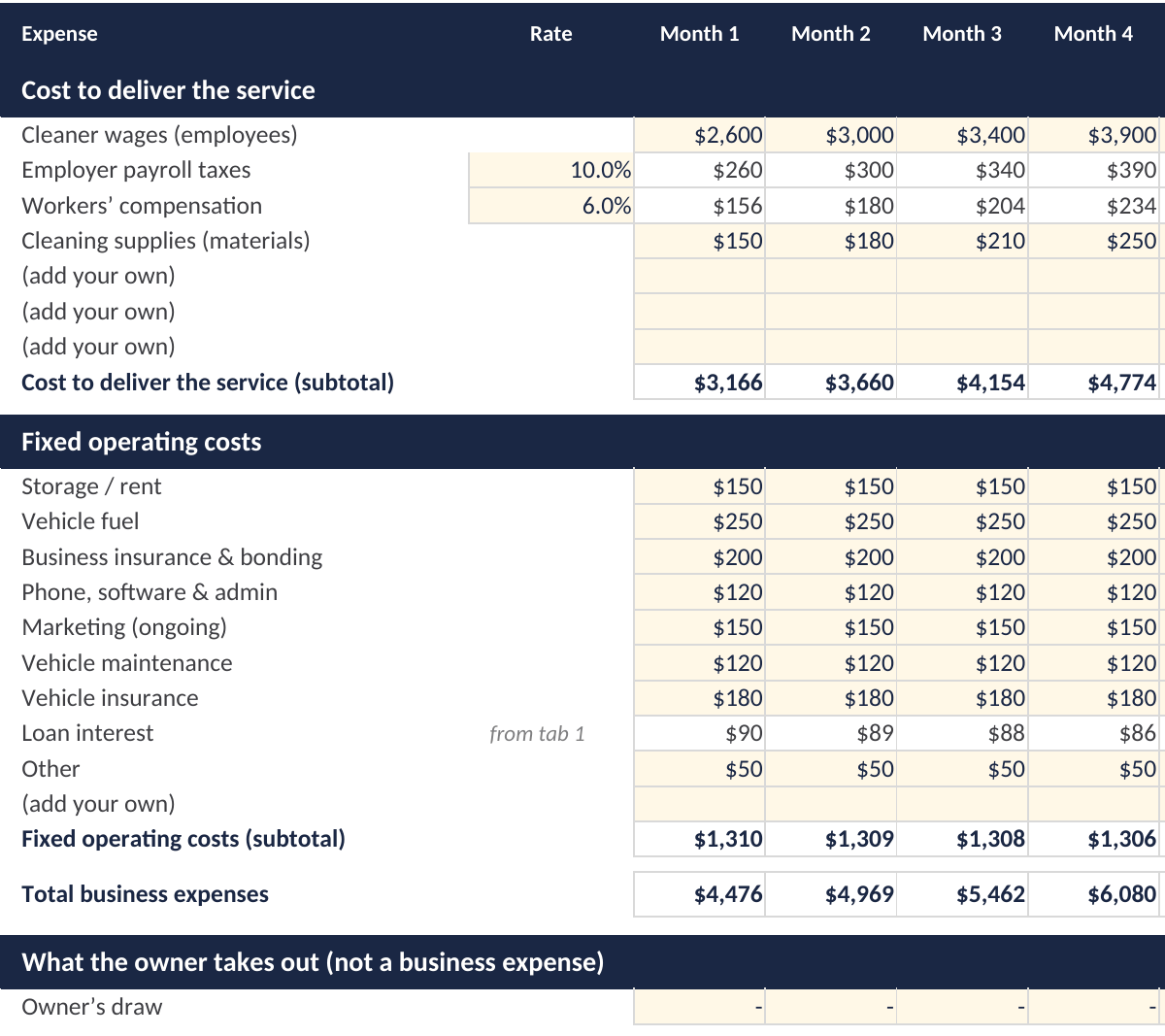
Cost to deliver the service sits at the top, and it's the block of expenses that increases in proportion to the volume of business you are producing: wages, payroll taxes, workers' comp, materials. Two of those lines take a percentage rather than a dollar figure. so if you enter ten percent for payroll taxes and six for workers' comp, the workbook applies them to your wage line every month automatically. Evergreen's delivery costs started at $3,166 and climbed as the routes filled up.
Fixed operating costs come next. Rent, utilities, insurance, phone and software, marketing, vehicle costs, professional fees. These barely move whether you've had a good month or a quiet one, which is the reason they're worth watching closely. Evergreen's ran about $1,310 a month, and the loan interest line inside that block fills itself in from tab 1.
The last block is the owner's draw, and it sits below the total for a reason. What you take home isn't a cost of running the business, so it doesn't touch your profit figure. It does come out of the bank account though, which is why the cash flow projection picks it up even when the income statement doesn't. Evergreen's owner drew nothing in year one, and that's a large part of why the numbers worked.
"Your financial life is like a garden. If you tend a garden carefully, nourishing the flowers, pruning, and weeding, it's going to be a lot more beautiful than if you just water it half-heartedly now and then."
- Suze Orman
The Assumptions Behind Your Numbers
Every figure you enter rests on a guess about how the year will go, and a lender reading your plan will want to know what those guesses were based on.
Some assumptions are easy to spot. Evergreen priced office accounts at $650 a month and counted on adding roughly one new account a month through the first half of the year. It assumed two part-time cleaners could cover the routes, and that the owner could go twelve months without taking a draw. Each of those is a decision someone could argue with, which is exactly why they belong on paper.
The assumption that can be a little tricky is the timing of payments for services rendered. You'll enter when you expect payments to be received on the Start Here tab, row 14. If you choose Same month the workbook assumes money lands the moment the work is done. If you pick Net 30 you are saying that customers will pay the following month, which is how most commercial clients operate.
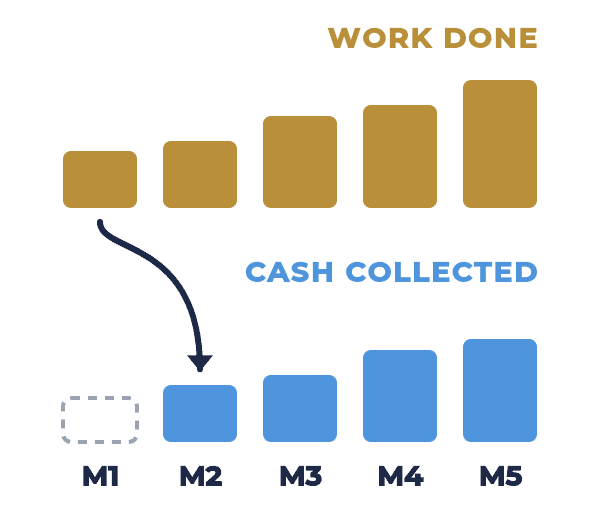
That one setting shapes your entire cash availability picture. Evergreen earned $3,500 in its first month and collected none of it until the second, so for thirty days the business was paying wages, fuel and insurance with nothing coming in.
If you sell to other businesses, assume Net 30 unless you've got a good reason not to. If your business caters to customers who pay at the time of purchase, then you'd enter Same month.
For everything else, the test is whether you could explain each number to a stranger in a sentence and tell them where it came from. A good basis for an assumption might include a price you are already charging, a quote someone has given you, a lease you've read, or a wage you've looked up for your area. When the honest answer is that you're not entirely sure, that's your cue to go and do more research to validate your claim before a lender does it for you.
Write your main assumptions into the business plan itself, even as a short list. A lender who can follow your reasoning will trust the result far more than a set of numbers that has not been well researched.
What Builds Itself: The Three Statements
The three statements answer three different questions. A business can look healthy on one while it's struggling on another, so the statements should be viewed collectively to get the full picture.
The cash flow projection is the one to read first. It follows your bank balance month by month, adding what comes in and subtracting what goes out, and the bottom line shows the result. Evergreen's went negative in month four, bottomed out at minus $678 in month five, and didn't climb back above zero until month seven. Nothing on the income statement would have told you that.
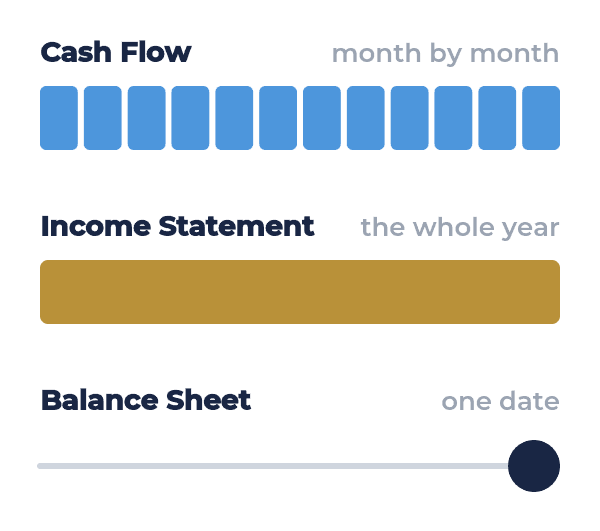
The income statement covers the whole year on a single page. Revenue sits at the top, then the cost of delivering the service, then your operating costs, with profit or loss at the bottom. A percent-of-sales column shows where each dollar went, and for Evergreen the line worth paying close attention was labor. Wages, payroll taxes and workers' comp together took 61.6 percent of everything the business brought in, which is the figure first-time owners most often underestimate.
The balance sheet is a snapshot of one day, the last day of your first year. It lists what the business owns, what it owes, and what's left over as the owner's equity, and the two sides have to match. Evergreen finished with $50,737 in assets against $10,010 owed, leaving $40,727 in owner's equity. The van and equipment stay at what you paid for them, since the workbook doesn't calculate depreciation, and that's worth mentioning if a lender or accountant asks.
One line on Evergreen's balance sheet deserves a closer look. $12,300 of those assets was money customers still owed, which is December's sales under Net 30 terms, earned in the final month and not yet paid. It's real money and it counts as an asset, but you can't pay wages with it until it arrives.
The Business Plan Financials Workbook checks the balance sheet for you and reports whether it balances. If it ever tells you it doesn't, go back through the three input tabs, because that's where an input error has occurred.
A Worked Example: Evergreen Office & Medical Cleaning
Evergreen is the business the tutorial walks through, and reviewing the example in full first will teach you more about how the workbook responds to the information entered in the three input tabs.
Evergreen cleans small offices and medical suites on evening routes, five nights a week, with one owner and two part-time cleaners. Before opening, the owner saved twelve months of personal living expenses so she could work in the business full time without drawing a salary from it, and that choice is a large part of why her numbers work so well in the earlier months of the year.
She needed $39,000 to open. A used van and cleaning equipment took $24,500 of it, another $6,500 went to one-time costs like her first insurance and bond premium and her launch marketing, and she held $8,000 back as a reserve. She covered it with $27,000 of her own money and a $12,000 loan over five years, which left nothing spare once the doors were open.
Her sales plan leaned on the difference between her two kinds of customer. Office accounts came quickly at $650 a month each. Medical suites paid better at $900, but they came on board more slowly, because a clinic wants references before it hands a stranger a key to the building. So her forecast adds an office account most months and a medical suite only every couple of months, and revenue climbs from $3,500 in month one to $12,300 by month twelve.
The workbook gave her the good news first. Year one clears $13,727 after every cost, a margin of about 13 percent, and her average month sits comfortably above the $3,755 she needs to break even.
It also showed her where the money goes. Once payroll taxes and workers' comp sit on top of wages, labor takes 61.6 percent of everything Evergreen brings in, and that additional cost can sink a business plan if not properly accounted for.
The cash flow tab showed a second problem. Because her clients pay thirty days after the work is done, her bank balance goes negative in month four and stays there until month seven. Her reserve absorbed most of that gap but not all of it. With that warning ahead of time, she can make adjustments: hold back a little more cash, ask her first medical clients to pay faster, or line up a small line of credit before she needs it.
None of this required a CPA degree. She did her research, filled in three tabs, and the workbook told her the rest.
How to Use the Business Plan Financials Workbook
Once you have all the information at hand, the workbook is quick to fill in. You are encouraged to follow the process in the following order to get the most out of the Business Plan Financials Workbook.
- Run through the entire tutorial once before you start entering your own numbers: Twenty minutes with Evergreen's numbers shows you how every tab connects, and you'll know your file is working when it matches the Completed Example. Once you've completed the tutorial, you're ready to begin entering your own numbers. To begin, open a fresh version of the workbook.
- Set payment timing before you type anything else: It's the only choice on the Start Here tab, and it reshapes your whole cash picture, so decide it first.
- Fill the input tabs in order: Work through startup costs, then sales forecast, then monthly expenses, because the loan payment on tab 1 flows into tab 3 and the statements need all three before they mean anything.
- Read the cash flow bottom line before the profit figure: A healthy year overall can hide three hard months, and the month your balance goes lowest tells you more about whether you'll survive than the annual total does.
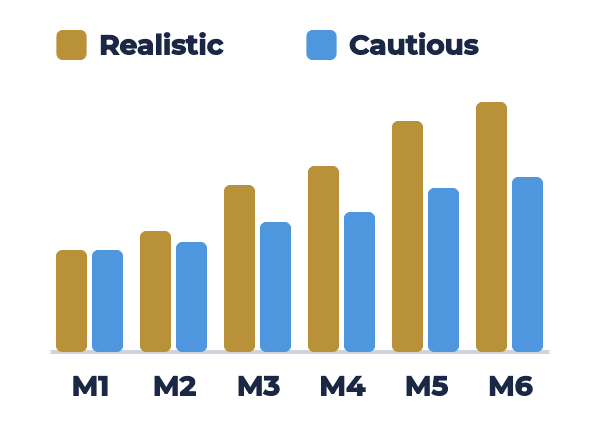
- Change one assumption at a time: Lower your price, slow your sales growth, or switch to Net 30, then go back to Start Here and watch the answers change. You'll learn quickly which numbers your business is most sensitive to.
- Save a copy for each version you test: Keep a realistic file and a cautious one side by side, so when a lender asks what happens if monthly sales come in slower, you already have the answer and can speak with confidence.
- Carry the results into your business plan: The statements and key answers belong in the Business Financials and Funding Request sections of your business plan template, and the figures there should match the workbook exactly.
Common Mistakes in Business Plan Financials
Most of the problems lenders find in first-time business plans come from the same handful of mistakes, and every one of them is easy to fix once you know where to focus.
- Starting month one too high: Opening-month sales are almost always lower than people hope. Start with a realistic first month and let the forecast climb at a reasonable pace from there.
- Counting wages but not the cost of employing people: Payroll taxes and workers' comp can add sixteen percent or more on top of wages. Leave them out and your labor cost, your break-even and your profit are all understated.
- Leaving out a cash reserve: Without one, the first slow month or late payment puts you into overdraft. Hold back enough to cover your lowest cash month with room to spare. If you can't do that, it may be worth delaying your start date until you can save or identify additional funding sources.
- Assuming customers pay the day the work is done: If you invoice other businesses, most will pay about thirty days after you invoice. Set the payment dropdown to match, or your cash flow will look far healthier than it is.
- Typing round totals instead of building them: Simply stating "About $5,000 a month" is hard to defend. Price per unit times number of units sold gives you a specific number you can explain to anyone who asks.
- Numbers that don't match the written plan: If your marketing section says you'll add two clients a month and your forecast adds five, a lender will catch it. Make sure that your story and the supporting numbers agree.
- Building one version and stopping: A single forecast is your best guess. A cautious version alongside it shows a lender you've already thought about what happens if things move slower than you expect.
- Treating it as finished once the plan is written: After you open the business, replace your estimates with real results each month. The gap between what you expected and what happened is where you'll learn the most.
The Rest of the Business Planning Toolkit
The Business Plan Financials Workbook enables you to gather and present the numbers for your first year, and it's one of seven free tools built to work together on a complete business plan.
- Business Plan Template and Guide: The written business plan for your new or existing business, with a step-by-step guide to every section. The workbook's statements and key answers drop straight into its Business Financials and Funding Request sections.
- Balance Sheet Template: A standalone balance sheet for when you need that one statement on its own, such as reporting what an existing business owns and owes on a specific date.
- Income Statement Template: A standalone income statement for recording actual results month by month once your business has real sales to report.
- Cash Flow Statement Template: A standalone statement of cash flows that tracks the money moving in and out of a business that's already operating.
- Mission Statement Template: Create a short statement of purpose that opens your business plan, which provides you and your team the big-picture reason for the business to exist.
- Business Plan Appendix: Where your supporting documents go, including the full financial statements a lender may ask to see.
If you're opening a new business, the workbook is the first place to start. The three standalone templates earn their place once the business is up and running, when you're reporting what happened rather than projecting results.
Frequently Asked Questions
Common questions about business plan financials, how they work, and how to use this workbook to inform your business plan.
Click on the (+) sign below to expand each question. Click the (-) sign to collapse it again.
What should the financial section of a business plan include?
Is the Business Plan Financials Workbook free?
Yes. The workbook and its tutorial are both free to download in PDF, Excel, Word and Google formats, with no email or signup required. Subscribing to the newsletter is optional and gets you the whole tool library on one page.
Do I need Excel to use the workbook?
No. The Google Sheets version calculates the same way and runs free in any web browser. The PDF is there if you'd rather read through it first or work your numbers out on paper.
How long does it take to complete the workbook?
Most people can work through the tutorial in about twenty minutes. Your own numbers take longer, mostly because of the research behind them, since real quotes and checked prices are what make the results worth trusting.
How many months of financial projections does a business plan need?
Most lenders want monthly projections for the first year, and many also ask for quarterly or annual figures for years two and three. The workbook covers the first twelve months in detail, which is the most critical time period for a new business.
What's the difference between a cash flow projection and an income statement?
The income statement shows whether the year made a profit, while the cash flow projection shows whether you'll have money in the bank each month along the way. A business can be profitable for the year and still run short of cash in the middle of it, which is why lenders want to see both views.
What does Net 30 mean in the workbook?
Net 30 means customers pay you about thirty days after the work is done, which is common when you invoice other businesses. Choosing it on the Start Here tab pushes each month's sales into the following month's cash, so your cash flow shows the gap you'll need to fund while you wait to be paid.
How does the workbook calculate break-even?
It works out how much you need to sell each month to cover both the cost of delivering your work and your fixed operating costs. You'll find the figure in Your Key Answers on the Start Here tab, along with the month your business first reaches it.
Can I use the workbook for an existing business?
Yes. Enter your current costs, recent sales, and running expenses, and the workbook shows you the same three statements and key answers. It's a useful way to see where your money is going before you plan a loan, an expansion, or a price change.
Does the workbook include depreciation?
No. Equipment and vehicles are shown at what you paid for them, and the workbook doesn't depreciate them over time. That keeps a first-year plan simple, but it's worth mentioning to your accountant or lender if they ask how your assets are valued.
Do I need an accountant to complete my business plan financials?
Not to build them. The workbook does the calculations, and the tutorial shows you what belongs in each cell. An accountant is still worth a conversation before you hand a plan to a lender, especially to check your tax assumptions and how your assets are recorded.
Can I add more revenue streams or expense lines?
Yes. The sales tab has room for four revenue streams, and you can rename any row to fit your business. To add a line, right-click the last row number in a section and choose Insert, and the new row falls inside the subtotal automatically.
Download Business Plan Financials Workbook & Tutorial

Download Free Business Plan Financials Workbook
Download Free Workbook Tutorial
Want the entire leadership tools library? Subscribe to our free newsletter and we'll send you a link to every tool on this site, all on one page, sorted by leadership phase. Every tool is free to download on its own page. The library just puts them in one place. Plus, you'll never miss out on updated or new tool announcements.
Your privacy is important to us. We never share or sell email addresses.
More Business Planning Tools




Contact Information:
phone
(503) 970-9777
Email Customer Service
helpsupport@leadership-tools.com
Email Richard
richard@leadership-tools.com

By Richard Gorham
Leadership-Tools.com
2879 Riverwalk Loop, Eugene, Oregon, 97401
Copyright (c) 2002 - 2026 All Rights Reserved