Yes. The PDF, Word, Google Docs, Excel, and Google Sheets versions of this Leadership 360 Degree Feedback Tool are all free. Subscribing to our free newsletter unlocks access to the complete leadership tools library.
- Home
- Leading People
- Leadership 360 Degree Feedback Tool
Free Leadership 360 Degree Feedback Tool: 32 Questions, 8 Categories, Auto-Scoring
If you're ready to see how your leadership is truly landing with the people you work with, this free Leadership 360 Degree Feedback Tool will help you collect honest, anonymous feedback from your manager, peers, and direct reports, and turn it into a clear next step.
This is a practical 360-degree feedback survey built around 32 statements across eight leadership categories. Raters answer anonymously, the workbook calculates a composite score and category breakdown automatically, and the leader walks away with a focused read on what's working and where to grow.
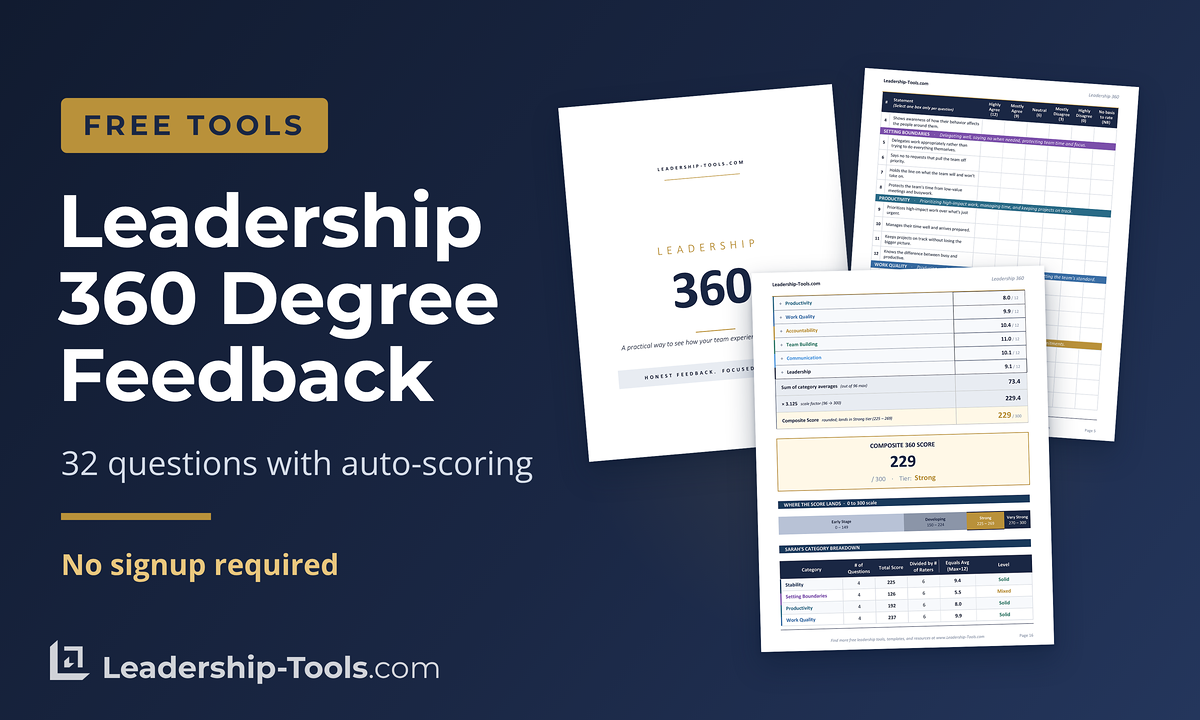
Download Free Leadership 360 Degree Feedback Tool:
Choose the format that fits how you work.
The Excel version handles the math for you and shows the category breakdown automatically. The PDF and Word versions are printable for raters who prefer paper. The Digital Rater Survey lets raters complete the form in Excel and email it back for fast copy-paste compilation.
This free leadership 360 feedback tool pairs directly with our Leadership Assessment, using the same eight skill categories so you can compare your self-view to the team's view side by side.
A 360-degree feedback survey is the natural next step after a self-assessment. A self-assessment shows what you intend. A 360 shows what the team experiences. The gap between the two is where real growth happens. It's a valuable tool for leaders developing their ability to lead people effectively within a broader leadership development framework.
This tool is built for busy, real-world leaders. It runs in about two weeks start to finish. It works for a small business with five raters or a department with ten. It's straightforward enough that an HR partner, executive coach, or mentor can administer it without specialized software.
Jump To: Start the 360 | What You Get | What This Tool Measures | How It Works | Sample Statements | Sample Results | Self vs. 360 Read | Step-by-Step Instructions | Email Templates | Confidentiality | FAQ |Get Updates Free |Download Tool
Start the Leadership 360
The free leadership 360 degree feedback exercise is simple to administer, regardless of which format you choose.
Plan on about two weeks. Pick a neutral administrator and five to ten raters, collect the surveys, and walk through the results together. The full step-by-step guide is below.
Ready to run your first 360?
Free Leadership 360 Degree Feedback Tool: What You Get
A complete leadership 360-degree feedback workbook with everything an administrator needs to run the process from start to finish:
- A 32-statement rater survey across eight leadership categories (four statements per category)
- Two rater survey formats: a printable PDF/Word version and a digital Excel version raters can complete and email back
- An auto-calculating Composite Results dashboard showing the composite score, category breakdown, top observed strengths, and areas to develop
- A "What the Raters Said" section that groups anonymous comments by category so themes are easy to spot
- An optional Self vs. 360 Comparison that shows the gap between self-view and team-view using the same eight categories as our Leadership Assessment
- A worked example (Sarah Mitchell, six raters, composite score of 229) so you can see what completed results look like
- An eleven-section Administrator's Guide covering confidentiality protocols, rater selection, distribution, compilation, the feedback session, and post-debrief follow-up
How the Scoring Works
Each response carries a point value: Highly Agree = 12, Mostly Agree = 9, Neutral = 6, Mostly Disagree = 3, Highly Disagree = 0. Raters who haven't observed a behavior can mark "No basis to rate" and that item is excluded from the math.
The composite score scales to a 0 to 300 range across four tiers: Early Stage, Developing, Strong, and Very Strong. These are the same tiers used in our Leadership Assessment, so the two scores are directly comparable.
In the Excel version, all of this happens automatically as the administrator enters rater responses. The PDF and Word versions are printable and scoreable on paper.
Tip for Best Results
Get the administrator right first.
A 360 run by the leader being assessed produces polite, useless feedback. A 360 run by a trusted third party produces honest, useful feedback. That single decision determines whether the tool delivers value or wastes everyone's time.
What This Leadership 360 Measures
This free Leadership 360 Degree Feedback tool groups its 32 statements into eight leadership skill categories, the same eight used in our Leadership Assessment.
This alignment matters: it means you can compare a leader's self-view directly to the team's view, category by category, without converting between different frameworks.
The Eight Leadership Categories
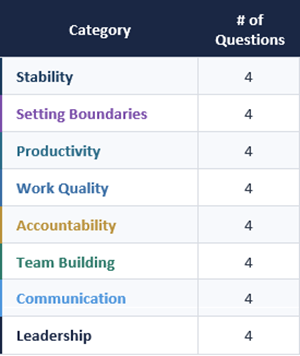
Stability
Composure under pressure, consistent presence, and openness to feedback. Leaders who score well here become the calm in the room.
Setting Boundaries
Delegating well, saying no when needed, and protecting the team's time and focus from low-value work.
Productivity
Prioritizing high-impact work, managing time, and keeping projects on track without losing the bigger picture.
Work Quality
Producing work that holds up, staying knowledgeable in their field, and setting the team's quality standard.
Accountability
Owning decisions and results, admitting mistakes, and following through on commitments without shifting blame.
Team Building
Investing in people one-on-one, encouraging teamwork over individual heroics, and treating team success as the goal.
Communication
Clarity in expectations, listening to understand, asking good questions, and sharing information openly and on time.
Leadership
Coaching others through challenges, contributing ideas, recognizing good work specifically, and bringing the kind of energy others want to follow.
Who This 360 Feedback Tool Is For
- New or aspiring leaders who want a clear read on how their leadership is landing
- Solopreneurs and small business owners leading freelancers, contractors, or a small staff
- HR and learning and development professionals running development programs or coaching cohorts
- Leadership coaches who want a ready-to-use 360 they can adapt for client work
- Experienced managers who want a refresh on how their leadership is being experienced today
How the Leadership 360 Degree Feedback Tool Works
This free Leadership 360 Degree Feedback tool has two main users: the administrator who runs the process, and the raters who provide the feedback. The leader being assessed only sees the final composite report.
Anonymity is built into the design.
Raters complete the survey using either the Print or Digital format. Their individual responses go into the administrator's Rater Responses tab. The leader only ever sees the Composite Results dashboard, which shows averages across all raters and aggregated comment themes, never individual scores or attributions.
The math handles itself.
Each statement uses a six-point response scale (Highly Agree through Highly Disagree, plus "No basis to rate"). The Excel version calculates the composite score, category averages, top strengths, and areas to develop automatically as the administrator enters responses. The PDF and Word versions are scoreable on paper for administrators who prefer that approach.
The Self vs. 360 Comparison adds depth.
If the leader has also completed our Leadership Assessment, the administrator can enter the leader's eight category averages on the optional Comparison tab. The tab then shows the gap between self-view and team-view for each category, with three reads: Aligned, Blind Strength, and Blind Spot. The blind spots are usually the most valuable findings.
Timeline.
Setup takes about an hour, including rater selection and explanation. Raters typically need ten to fifteen minutes each. Total elapsed time from launch to debrief is about two weeks.
Sample Statements from the Leadership 360-Degree Feedback Survey
Here are real statements from the full 32-statement free Leadership 360 Degree Feedback tool, grouped by category. These give you a sense of the tone and depth of the questions raters will answer.
Stability
- "Stays composed when things go wrong or pressure builds."
- "Receives feedback openly instead of getting defensive."
- "Shows awareness of how their behavior affects the people around them."
Setting Boundaries
- "Says no to requests that pull the team off priority."
- "Protects the team's time from low-value meetings and busywork."
- "Delegates work appropriately rather than trying to do everything themselves."
Productivity
- "Prioritizes high-impact work over what's just urgent."
- "Knows the difference between busy and productive."
Work Quality
- "Produces work that holds up and rarely needs to be redone."
- "Sets a quality standard the team can follow."
Accountability
- "Owns their decisions and results without shifting blame."
- "Tells the truth, even when the news is uncomfortable."
Team Building
- "Invests time in developing each team member, not just the strongest performers."
- "Treats team success as the goal, not personal credit."
Communication
- "Listens to understand, not just to wait for their turn."
- "Shares information openly and on time, not after the fact."
Leadership
- "Coaches their people through challenges instead of solving for them."
- "Recognizes good work publicly and specifically."
Raters answer each statement on a six-point scale (Highly Agree through Highly Disagree, plus "No basis to rate" for behaviors they haven't observed). The full survey includes 32 statements total, four per category.
Optional Comments by Category
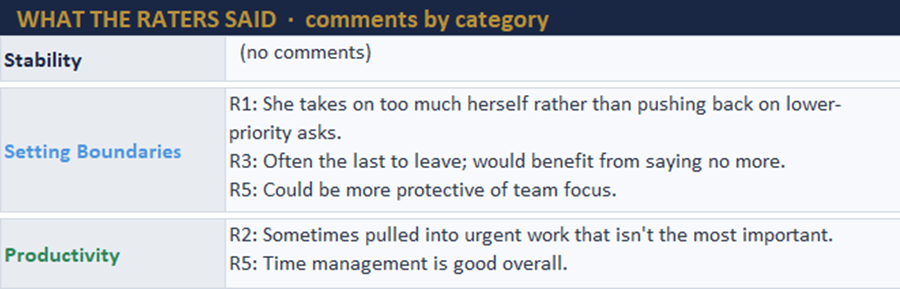
Raters can also leave one optional comment per category. Comments add depth that numbers alone can't capture, and they're aggregated in the Composite Results, so the leader sees themes without seeing who said what.
Sample Results: What the Final Report Looks Like
Once the administrator has compiled responses, the Composite Results dashboard gives the leader a clear, focused read on how the team experiences their leadership. Here's an example from the worked example included in the tool.
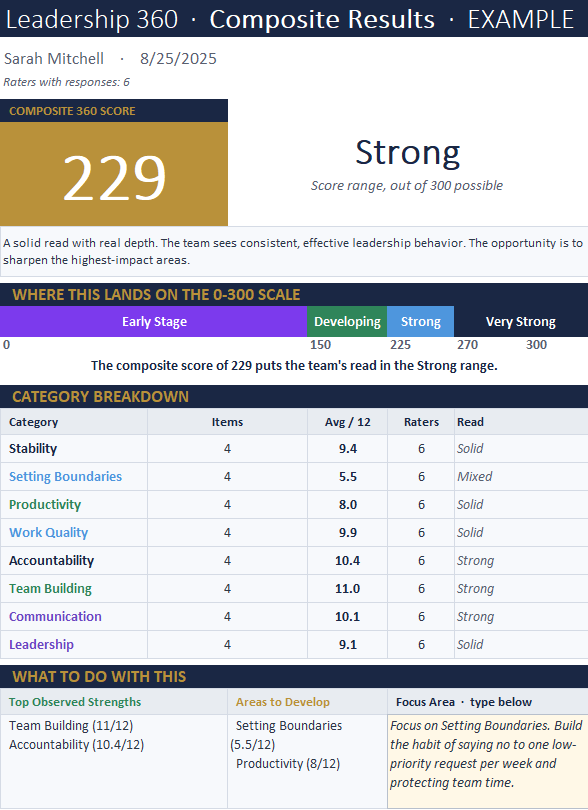
The dashboard shows four things at a glance:
- The composite score (0 to 300 scale) and which tier it falls into
- The category breakdown with each of the eight skill averages and a qualitative read (Strong, Solid, Mixed, Weak)
- Top Observed Strengths and Areas to Develop, pulled automatically from the highest and lowest categories
- A recommended First Move based on the score range, with space for the leader to write their own focus area
Below the dashboard, a "What the Raters Said" section groups all of the anonymous comments by category, so the leader can read the themes that go beyond the numbers.
After the debrief, the leader's job is simple: pick one focus area from the free Leadership 360 Degree Feedback Tool report, name one specific behavior to practice, and reassess in a year.
The Self vs. 360 Read (Optional)
The most powerful insight from a 360 isn't the team's score. It's the gap between how the leader sees themselves and how the team sees them.
If the leader has also completed our individual Leadership Assessment, this free Leadership 360 Degree Feedback tool includes an optional Self vs. 360 Comparison tab. The administrator enters the leader's eight self-scores in the gold cells, and the tab shows the gap for each category along with suggestions on how to address each gap.
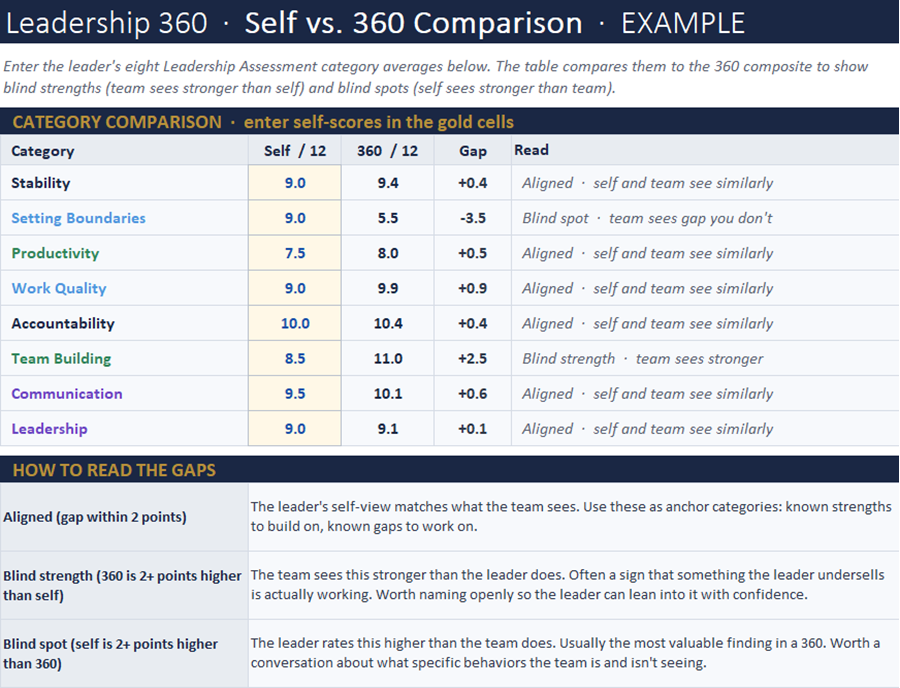
Aligned (gap within 2 points):
The leader's self-view matches what the team sees. These are the anchor categories, known strengths to build on and known gaps to work on.
Blind Strength (360 is 2+ points higher than self):
The team sees this stronger than the leader does. Often a sign that something the leader undersells is landing well. Worth naming openly so the leader can lean into it.
Blind Spot (self is 2+ points higher than 360):
The leader rates this higher than the team does. Usually, the most valuable finding in a 360, and the hardest conversation. Approach with curiosity, not accusation.
The Leadership Assessment uses the same eight categories and the same scoring scale, which is what makes this side-by-side comparison possible without converting between frameworks. If you haven't taken the Leadership Assessment yet, it's a useful starting point before running the 360.
"The first step toward change is awareness. The second step is acceptance."
- Nathaniel Branden
Step-by-Step Guide: Running Your First Leadership 360
This is the full administrator workflow for running the free Leadership 360 Degree Feedback tool. The included Administrator's Guide in the workbook covers each of these in more depth.
Step 1: Confirm the Leader Wants the Feedback
Don't impose a 360 on someone. Confirm the leader is open to honest feedback before you go any further. If they're anxious about it, address that first. A 360 the leader resents will produce a polished, useless report.
Step 2: Select an Administrator (Not the Leader)
The administrator must be a trusted third party. An HR partner, executive coach, mentor outside the leader's reporting chain, or a peer leader from another team all work well. The leader administering their own 360 breaks anonymity the moment the surveys come back to their desk.
Step 3: Choose Five to Ten Raters
Aim for a balanced mix: the leader's manager, two to four peers, and two to four direct reports. In smaller settings, long-term clients or contractors who see the leader regularly can substitute for direct reports. Contact each potential rater before sending the survey to confirm they're willing to participate honestly.
Step 4: Distribute the Rater Survey
Choose Print or Digital based on each rater's preference. Fill in the three placeholders at the top (leader name, administrator name, deadline). Email the PDF, distribute physical copies, or share the Digital Excel file. Give raters one to two weeks to respond, with one gentle reminder midway through.
Step 5: Compile the Responses
As surveys come back, enter each rater's answers into the next available R column (R1 through R10) on the Rater Responses tab. The Digital format makes this fast: copy the rater's response column from the file they returned and paste it directly into the next R column. For paper returns, type each rater's responses into the dropdowns.
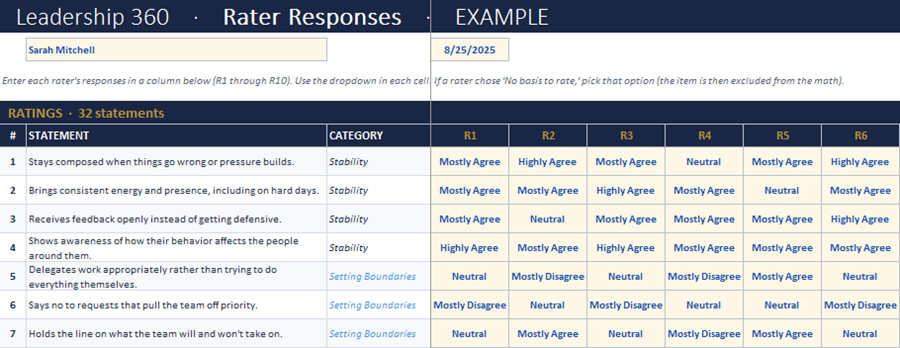
Step 6: Read the Composite Results
Open the Composite Results tab. The dashboard calculates as you enter responses. Look at the composite score first, then the category breakdown. Scan the lowest scores. Read the comments grouped by category. Themes (three or more comments saying similar things) are signals; single comments are one person's view.
Step 7: Run the Self vs. 360 Comparison (Optional)
If the leader has completed the Leadership Assessment, enter their eight self-scores into the Self vs. 360 Comparison tab. The blind spots are usually the most valuable findings. The blind strengths are often worth naming openly so the leader can use them more deliberately.
Step 8: Have the Feedback Conversation
Schedule sixty to ninety minutes, one-on-one, in a private space. Walk through the dashboard together. Pause after each section. Ask, "What stands out? What rings true? What surprises you?" Close by helping the leader pick one focus area for the next quarter.
Step 9: Follow Through
Give the leader a copy of the Composite Results (print the tab or save as PDF). Never share the Rater Responses tab, that one stays with the administrator. Schedule a one-year re-take to measure growth, and send a brief thank-you to the raters confirming the process is complete.
Email Templates for Running the 360 (Copy-Paste Ready)
These three short emails cover the full communication arc with raters when using the free Leadership 360 Degree Feedback tool. Customize the bracketed sections and use them as written. They're sent from the administrator, not the leader being assessed.
1. The Invitation
Subject:
Quick favor for leadership feedback for [Leader's Name]
Hi [Rater's First Name],
I'm running a 360-degree leadership feedback survey for [Leader's Name] as part of their development. [He/She/They] specifically asked to include you because you work with [him/her/them] regularly and would have a useful perspective.
Your responses will be anonymous. I'm the one collecting the surveys, and the report [Leader's Name] receives will only show averages across all raters, never individual scores or comments tied to a person.
The survey takes about 10 to 15 minutes. You can complete it on paper, as a PDF, or in Excel, whichever you prefer. The deadline is [date], about two weeks from today.
Are you willing to participate? If yes, I'll send the survey over today.
Thanks,
[Administrator's Name]
2. The Mid-Point Reminder
Subject:
Friendly reminder about 360 feedback for [Leader's Name]
Hi [Rater's First Name],
Just a quick reminder that the 360 feedback survey for [Leader's Name] is due [date]. If you've already returned it, thank you, you can ignore this.
If you haven't gotten to it yet, no pressure. Honest feedback is more valuable than fast feedback. Let me know if you need the survey resent, or if you'd prefer a different format than what I sent originally.
Thanks,
[Administrator's Name]
3. The Thank-You
Subject:
Thank you. The 360 feedback is complete
Hi [Rater's First Name],
Just confirming that the 360 feedback for [Leader's Name] has been collected and compiled. Thank you for taking the time to share your perspective.
As promised, your individual responses stayed anonymous. [Leader's Name] received a composite report showing category averages and aggregated comment themes, with no attribution to any one rater.
Your feedback is very helpful. Thanks again.
[Administrator's Name]
Confidentiality Statement (Copy-Paste for Raters)
Use this short statement when introducing the 360 to your raters. It captures the confidentiality commitments built into the tool's design. The block below is the rater-facing version; copy and paste verbatim or adapt as needed.
Your responses are anonymous. The administrator named above is the only person who sees individual responses. The leader being assessed will receive a composite report showing averages across all raters and aggregated comment themes by category. Individual scores and individual comments are never attributed to a specific rater. If a comment is specific enough that it could identify a rater (such as a date, meeting, or project name), the administrator will share the theme rather than the comment verbatim. The Rater Responses tab is never shared with the leader.
A Note on Rater Pool Size
Anonymity depends on the rater pool being large enough to protect individual identity. As a rule of thumb:
- A minimum of three raters per role (manager, peer, direct report) before showing role-level breakdowns
- A minimum of five total raters before running the 360 at all
- If your rater pool is smaller than five, consider waiting until you can build a fuller pool, or focus on themes across the whole group rather than role-level breakdowns
The included Administrator's Guide in the workbook covers six confidentiality protocols in more depth, including how to store completed surveys, when to paraphrase comments, and when not to run a 360 at all.
Watch-Outs Worth Knowing
A few practical notes that help the free Leadership 360 Degree Feedback Tool deliver real value.
- Don't surprise the leader. Confirm the leader actively wants this feedback before you launch. A 360 imposed on someone produces resistance, not insight.
- Don't run it with too few raters. Five is the practical minimum. Below that, anonymity becomes hard to protect and the math gets noisy. Patterns need volume to be readable.
- Don't let the results sit. If raters take the time to share thoughtful feedback and never see the leader act on it, trust drops. Even small visible changes signal that the feedback mattered.
- Don't use 360 results for performance reviews, promotions, or compensation. The tool is built for development. Using it any other way breaks the trust contract that makes honest feedback possible, and the next 360 in the organization will be useless.
The included Administrator's Guide covers more in the "What this tool isn't for" section.
Frequently Asked Questions
Is this leadership 360 feedback tool really free?
How long does it take to run a 360?
About two weeks start to finish. Setup and rater selection take about an hour. Raters typically need ten to fifteen minutes to complete the survey. The two-week window is mostly the response time you give your raters, plus the compilation and debrief.
How many raters should I invite?
A practical minimum is five raters; ten is the upper end for most situations. A balanced mix works best: the leader's manager (1), peers (2 to 4), and direct reports (2 to 4). More raters generally improve reliability, but the best results come from selecting people who regularly observe the leader's behavior.
Can the leader administer their own 360?
No. The administrator must be a trusted third party, an HR partner, executive coach, mentor outside the reporting chain, or a peer leader from another team. The leader administering their own 360 breaks anonymity the moment the surveys come back to their desk, and raters will respond accordingly.
How is anonymity protected?
The leader only ever sees the Composite Results dashboard, which shows averages and aggregated comment themes by category, never individual scores or attributed comments. The administrator handles all collection and compilation. Individual rater responses live in the Rater Responses tab, which is never shared with the leader.
What's the difference between the Excel, PDF, Word, and Google formats?
All five formats use the same 32 statements and the same scoring math. The Excel and Google Sheets versions calculate the composite score, category breakdown, and reads automatically as the administrator enters responses. The PDF and Word versions are printable and scoreable on paper, useful for administrators or raters who prefer that approach. Most administrators use Excel because it does the math, and use the printable formats for raters who prefer paper.
What's the Self vs. 360 Comparison tab?
It's an optional tab that compares the leader's self-assessment scores to the 360 composite, category by category. If the leader has completed our Leadership Assessment (which uses the same eight categories and same scoring scale), the administrator can enter the eight self-scores into the Comparison tab. The tab shows whether each category is Aligned, a Blind Strength, or a Blind Spot. The blind spots are usually the most valuable findings in a 360.
What if our team is too small for a 360?
If you can't field at least five raters who regularly observe the leader, consider waiting until you can build a fuller pool. Alternatively, focus on themes across the whole group rather than breakdowns by role, and be transparent with raters about the limits on anonymity in a small pool. The Administrator's Guide in the workbook covers small-team adaptations in more depth.
How often should we run a 360?
Annually is a healthy cadence for using the free Leadership 360 Degree Feedback Tool for most leaders. Running a 360 too often (every quarter, for example) can fatigue raters and dilute the signal. A yearly re-take, with focused practice on one or two behaviors in between, gives you something meaningful to compare year over year.
Can I use this for performance reviews?
No. Using 360 results for performance reviews, compensation, promotion, or discipline breaks the trust contract that makes honest feedback possible. Once raters realize their feedback was used as a performance tool, they won't participate honestly again. The 360 is a development tool. Keep it that way.
Download Leadership 360 Degree Feedback Tool
Want the entire leadership tools library? Subscribe to our free newsletter and we'll send you a link to every tool on this site, all on one page, sorted by leadership phase. Every tool is free to download on its own page. The library just puts them in one place. Plus, you'll never miss out on updated or new tool announcements.
Your privacy is important to us. We never share or sell email addresses.
Leadership Tools Newsletter
Subscribe Free - See All Tools on One Page - Get New Tool Alerts
More Leadership Tools for Managing Your Team



Richard Gorham has led teams in financial services for more than 30 years, from retail branches and operations to investments and insurance, and he still leads a team today.
He founded Leadership-Tools.com in 2002 to give managers free, practical tools like the ones he used in his various leadership roles. Every tool here has been used in a real workplace and comes with a filled-in example you can follow.

Contact Information:
phone
(503) 970-9777
Email Customer Service
helpsupport@leadership-tools.com
Email Richard
richard@leadership-tools.com

By Richard Gorham
Leadership-Tools.com
2879 Riverwalk Loop, Eugene, Oregon, 97401
Copyright (c) 2002 - 2026 All Rights Reserved