Total compensation is everything the company paid for one employee in one year: cash pay, paid time off, the company's share of insurance, retirement contributions, employer payroll taxes, and perks. It's the company's cost, not the employee's take-home pay, and for many jobs it runs 25 to 40 percent above base pay.
- Home
- Leading Teams
- Total Compensation Statement
Total Compensation Statement Template
Our free total compensation statement template shows an employee everything the company paid on their behalf in a year, on one page. It's an Excel workbook that calculates the payroll taxes for you, and it comes with a Leader's Guide and a filled-in example.
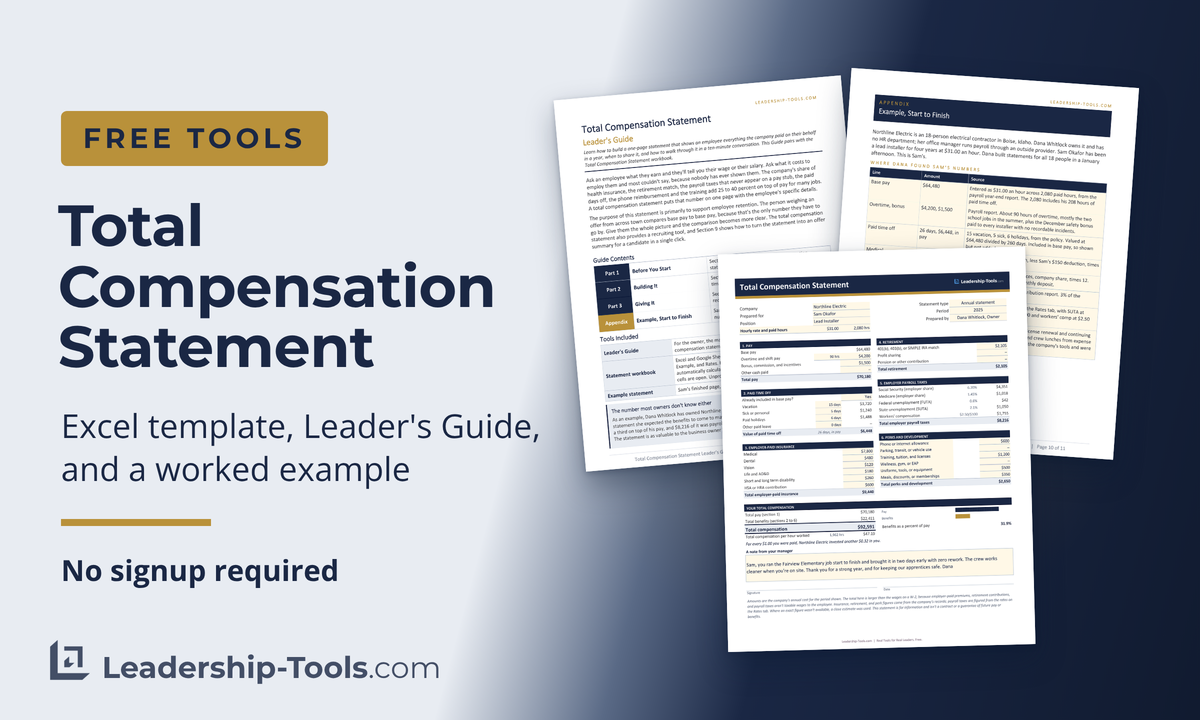
Ask an employee what they earn and they'll tell you their wage or their salary. Ask what the company invests on their behalf and most couldn't say, because nobody has ever shown them. The company's share of health insurance, the retirement match, the payroll taxes that never appear on a pay stub, the paid days off, the phone reimbursement and the training add 25 to 40 percent on top of pay for many jobs.
The purpose of this statement is primarily to support employee retention. The person weighing an offer from across town compares base pay to base pay, because that's the only number they have to go by. Give them the whole picture and the comparison becomes clear and assists them in making a more informed decision.
Total Compensation Statement:
Total Compensation Statement Leader's Guide:
Total compensation statement template at a glance
| Formats | Excel, Google Sheets, PDF, Word, Google Docs |
| Ideal for | Owners with no HR, managers, and HR partners |
| Includes | Statement workbook (4 tabs) + Leader's Guide (11 pages) + filled-in example |
| Takes | About 20 minutes for the first one |
| Pairs with | Succession Planning, Skip-Level Review, Employee Exit Survey |
Not sure which file you need?
| Take the Excel workbook if you have Excel. It calculates the payroll taxes, the totals and the per-hour line for you. | |
| Take Google Sheets if you'd rather work in a browser. File, Make a copy, and the formulas and drop-downs come along. | |
| Take the PDF to see Sam's finished statement before you build your own, and read the Leader's Guide once before the first conversation. |
Jump To: What It Shows | Example | What's in the Template | How to Fill It In | Salaried or Hourly | Paid Time Off | Payroll Taxes | What to Leave Off | The Conversation | Recruiting | Five Mistakes | FAQ | Download
What a Total Compensation Statement Shows

A total compensation statement is a one-page summary of what the company paid for one employee in one year: cash pay, paid time off, the company's share of insurance, retirement contributions, employer payroll taxes, and perks.
After entering the necessary data fields, it calculates the total compensation and tells the employee: for every dollar of pay, the company invested this much more on your behalf.
Under the total is a second number, total compensation per hour worked. It's the figure an employee remembers, because it sits beside the hourly rate on their pay stub, and it's the one an owner uses when offering an hourly position to a candidate.
| Use it to | Don't use it to |
| Show a good employee what the company already invests in them, once a year, with their name on it | Answer a request for a raise. A statement handed over in place of an answer reads as a dodge. |
| Make the comparison honest when someone is weighing an offer that pays a little more in base | Prove that someone who is underpaid isn't. If the base is below market, the benefits don't fix it. |
| Give a candidate the whole picture of an offer, to include their total compensation value received | Replace a benefits enrollment guide. This is a summary of cost, not an explanation of coverage. |
Some companies call this a total rewards statement. The names are used for the same document, though a total rewards statement sometimes adds things that carry no price, like a flexible schedule. This template only includes dollar amounts that are verifiable and not subject to opinion.
Example: Sam Okafor at Northline Electric
Northline Electric is an 18-person electrical contractor in Boise, Idaho. Dana Whitlock owns it and has no HR department, and her office manager runs payroll through an outside provider. Sam Okafor has been a lead installer for four years at $31.00 an hour. Dana built statements for all 18 people in a January afternoon, and this is Sam's.
Dana expected the benefits to come to maybe ten thousand dollars. The bottom band of Sam's finished statement is below, and the gap between what she expected and what she found is the reason the statement is as valuable to the business owner building it as to the employee receiving it.

The Appendix of the Leader's Guide traces every line on that page back to where Dana found it: the payroll year-end report, the carrier invoices, the retirement plan's contribution report, and the expense reports. The whole statement, filled in, is in the download file.
What's in the Total Compensation Statement Template
Most of the figures needed to complete the template live in three places: the payroll provider's year-end report, the benefits invoices, and the retirement plan's annual summary. Pull those three sources first and the total compensation statement is simple to complete. Every figure entered reflects the company's cost, not the employee's, and all numbers are annual.
| Section | What goes in | Where it comes from |
| 1. Pay | Base pay, overtime, bonus and commission, and any cash allowances. | Payroll year-end report, by employee. The row above section 1 takes either an annual salary or an hourly rate and paid hours, and fills in base pay for you. |
| 2. Paid time off | Vacation, sick, holiday, and other paid leave, in days. | The time-off policy or the payroll leave balances. Enter days; the workbook calculates the value of them. |
| 3. Insurance | Company share of medical, dental, vision, life, disability, and any HSA or HRA deposit. | Benefits invoices for the year, or the payroll report's employer-paid benefits column. Subtract the employee's deductions. |
| 4. Retirement | 401(k), 403(b), or SIMPLE match, profit sharing, pension. | The plan's year-end employer contribution report, by participant. |
| 5. Payroll taxes | Social Security, Medicare, FUTA, SUTA, workers' comp. | Figured by the workbook from the Rates tab. To use the actual employer tax from your payroll report instead, unprotect the sheet first and type over the formulas. |
| 6. Perks | Phone, parking, training, wellness, uniforms, tools, meals, memberships. | Expense reports and the general ledger. Count only what the company paid for that person. |
How to Fill In the Template, Step by Step
- Choose salaried or hourly. The row just above section 1, cell B7, provides a drop-down menu. Type the salary amount, or the hourly rate and the paid hours, and base pay then calculates the total.
- Enter the cash pay. Overtime, bonus and commission, and any cash allowances, all from the payroll year-end report.
- Enter paid time off in days. Answer the question at the top of the section first, since that decides whether the days are added to the total or shown as already in pay.
- Enter the company's share of insurance and retirement. Benefits invoices for insurance, the plan's year-end contribution report for the match. Never include the employee's own deductions.
- Check the Rates tab once, then print. Put in your state unemployment rate and your workers' comp rate the first time. The payroll taxes, the totals, the per-hour line and the closing sentence all calculate on their own.
Fill in the cream-colored cells and the total compensation worksheet automatically calculates the rest. Each of the tabs is protected so users can enter data only on the cream-colored cells. This was done to keep formulas from being accidentally corrupted.
If you want to customize any part of the worksheet, you can unprotect any worksheet by clicking Review, then Unprotect. No password required.
Salaried or Hourly Wage, and Why It Changes the Total
Choose Annual salary and enter the salary amount, and that's all you need. If you choose Hourly rate, you'll enter both the rate and the number of paid hours. The worksheet will automatically calculate the total. Paid hours are the hours the person was paid for, time off included, and a full-time year is usually calculated at 2,080 hours.
The selection also decides the last line of the total compensation statement. For an hourly employee the hours reflect the number of hours worked, and don't count days off. Hourly employees typically qualify for overtime hours, which is entered in the overtime row. Additionally, you'll enter any bonuses and incentive pay received.
For a salaried employee nobody logs overtime. It doesn't matter whether you're working 38 or 52 hours a week, so the line reads total compensation per scheduled hour and leaves overtime hours out of the equation.
Paid Time Off, Without Double Counting
This is the part that's easiest to get wrong, and it's worth a careful look. A salaried employee is paid for 2,080 hours, which is full-time, and that includes days they took off using available PTO. If the statement lists base pay and then adds the value of the time off on top, it has paid for those days twice.
The workbook asks one question at the top of the section: is paid time off already included in base pay? For almost everyone the answer is Yes, because salary covers the whole year and hourly base pay is figured on paid hours. The number of days is still shown, with their value and a label, but the amount isn't added to the total.
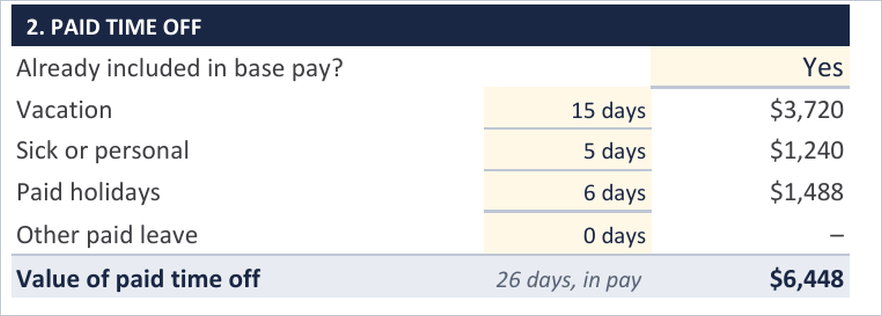
Answer No only when the base pay figure you entered covers hours worked and nothing else, which happens with some part-time and seasonal arrangements. In that case the workbook will add the value to benefits and include it in the total compensation amount.
It's often the first time an employee has seen their time off as a number. Dana's crew knew they got three weeks, and nobody had told them what three weeks was worth.
When completing the total compensation statement template be certain you are entering data according to the instructions in the Leader's Guide to ensure the totals are reflected accurately.
Payroll Taxes, the Money Nobody Sees
For every dollar of pay, the company pays Social Security and Medicare tax, federal and state unemployment insurance, and workers' compensation insurance. None of it appears on a pay stub, because none of it comes out of the employee's pay. On most statements it lands as the second biggest benefit line after medical insurance.
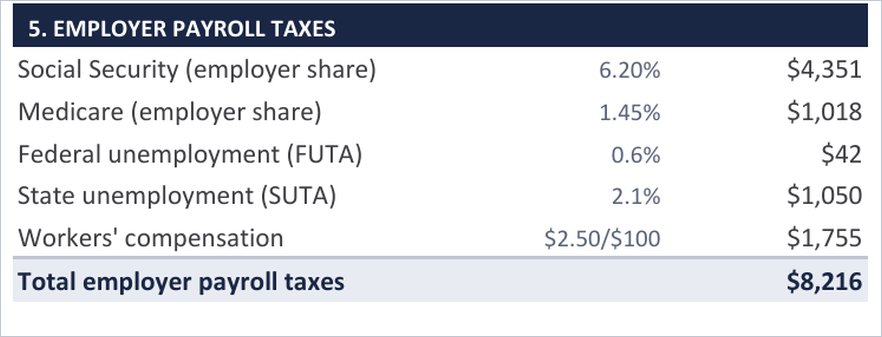
The total compensation statement template calculates all five employer payroll tax numbers from the Rates tab. Put in your state unemployment rate and your workers' comp rate the first time, and update the federal figures each January.
| Tax | How it's figured | Where to find your rate |
| Social Security, employer share | 6.2% of pay | Federal rate. It applies to pay up to the wage base, $184,500 in 2026. Check ssa.gov each year. |
| Medicare, employer share | 1.45% of pay | Federal rate, no cap. |
| Federal unemployment (FUTA) | 0.6% of the first $7,000 | The net rate after the state credit, from the IRS Form 940 instructions. |
| State unemployment (SUTA) | Your rate, on your state's wage base | Your state's annual rate notice. Rates run from under 1% to over 6%, and wage bases from $7,000 to more than $70,000. |
| Workers' compensation | Your rate per $100 of pay, by job class | The rate page of your policy. Office work is often under $0.50, and trades and warehouse run $2 to $8. |
"We will often find compensation if we think more of what life has given us and less about what life has taken away."
- William Barclay
What to Leave Off
An employee who sees a line they'd argue with may question the rest of the total compensation statement, so leave these items off the page.
- The intangibles: a short commute, a flexible schedule, a good crew, a respected name. Say them out loud in the conversation, but don't put a price on them.
- Equipment the employee uses to do the job: a company van and meters are company tools. A tool allowance the employee spends themselves counts.
- The employee's own money: their 401(k) deferral, their share of the premium, their pre-tax deductions, along with anything the company didn't pay this year and any retail or "market" value.
The Ten-Minute Conversation
Deliver the total compensation statement to the employee and discuss it in a one-on-one or annual review. Mailing it or dropping it in a pay envelope gets it read once and filed. Sitting down with the employee ensures the statement is understood, and gives the employee a chance to ask any clarifying questions.
SCRIPT: GIVING THE STATEMENT
Before we get into the year ahead, I want to review your total compensation statement. This is everything the company paid on your behalf last year. Your pay is at the top, and the rest is what goes on behind it: the company's share of your health plan, the 401(k) match, the payroll taxes we pay on top of your wages, your paid time off, and the smaller things like your phone and your license renewal.
The number at the bottom is the total. For every dollar you were paid, the company put in another thirty-two cents. The reason I'm showing this to you is so you understand the total value you are receiving as an employee here. (Briefly review each section with the employee.)
Now that you've had a chance to review the statement, is there anything on here that surprises you, or anything that doesn't look right? If you think of any questions later on, just let me know.
Edit the script's wording as you see fit. If they find an error, thank them and correct it the same day. If they ask about a raise, answer the question as you would at any other time: remind them when pay is reviewed, what it's based on, and what they'd need to show to support a raise in pay. Don't point at the benefits line.
The question about the W-2
A total compensation statement template highlights the total value received by the employee. The total value will always come to more than the W-2 amount the employee sees in January, but the employee must understand the difference. If not, an employee who notices the gap will either wonder which number is real or assume the statement is inflated. The answer is simple, and it's important to be ready for the question before you sit down for the conversation.
Employer-paid premiums, the retirement match, and employer payroll taxes are real money the company spent on that person, and none of them are taxable wages, so none of them appear on a W-2. A W-2 reports what the employee was paid and taxed on. The total compensation statement reports what the company spent on behalf of the employee. Both numbers are accurate, and they answer different questions.
The small print at the bottom of the statement makes the difference clear but say it out loud anyway. For reference, see the example in the total compensation statement template where is says, "For every $1.00 you were paid, Northline Electric invested another $0.32 in you."
Lastly, the box at the bottom of the statement is for the manager to write a brief note. Write the note by hand whenever possible. That small effort makes the conversation more meaningful to the employee. Name one thing the person did this year, with some small level of detail, and sign it.
Using the Statement in Recruiting
A candidate comparing two offers compares base pay, because that's what both offers state. If your base is $2,000 lower but your medical plan costs the employee half as much and your match is twice the size, you risk losing the candidate solely on base pay, when you are making the better total offer. The workbook's "Offer summary" setting turns the statement into that whole number for a candidate in one click.
- Choose Offer summary in the Statement type cell, G4. The title changes, the closing sentence reads "would invest" instead of "invested," and the heading on the note box takes the name from Prepared by.
- Fill it with the offer: the base pay you're offering, the time off they'd start with, the company's share of premiums at the plan tier they'd likely choose, the match at the offered pay, and the perks that apply from day one.
- Leave off anything that depends on performance or tenure unless it's guaranteed. A bonus listed as "up to" an amount belongs in the conversation rather than on the statement.
- Give it with the written offer, not instead of it, and say in the cover note that the offer letter governs the terms. Never give the offer summary as part of a counteroffer, because by then the candidate has compared base pay and it reads as a late argument.
Five Mistakes That Waste a Statement
| Mistake | What to do instead |
| Counting the days off twice | Base pay already includes paid time off for nearly everyone. Answer Yes to the workbook's question and let the days print as already in pay. |
| Using retail values | The company's cost is the number presented. Numbers that assume a higher retail value undermine the credibility of the total compensation statement. |
| Giving it in place of an answer | A statement that is delivered after a raise request, a benefit cut, or a resignation reads as a counter-argument. Provide the statement on an annual schedule. |
| Mailing it | A page handed over in an envelope gets read once. Delivered with a ten-minute conversation, the statement gets understood, and the employee has an opportunity to ask any clarifying questions. |
| Skipping the market check | If the base is below what the employee could get across town, the total compensation statement template makes the gap more visible, not less. Fix the base first. |
Frequently Asked Questions
The questions below address what leaders most commonly ask about the total compensation statement template.
Click on the (+) sign below to expand each question. Click the (-) sign to collapse it again.
What counts as total compensation?
Should paid time off be included in a total compensation
statement?
Show it, but don't add it twice. Base pay already includes paid time off for nearly everyone, because salary covers the whole year and hourly base pay is figured on paid hours. The template asks one question at the top of that section and handles it for you, so the days appear with their value without being counted a second time.
Does the template figure payroll taxes?
Yes. Social Security, Medicare, federal unemployment, state unemployment, and workers' compensation are all calculated from the Rates tab. You supply your state unemployment rate and your workers' comp rate the first time, and update the federal figures each January.
How often should you give an employee a total compensation statement?
Once a year, early in the year to coincide with annual reviews. Give it in person and walk through it, rather than mailing it or dropping it in a pay envelope.
Can a total compensation statement be used for a job offer?
Yes. The workbook has an Offer summary setting that turns the statement into a whole-number view of an offer for a candidate. Give it with the written offer, not instead of it, and say in the cover note that the offer letter governs the terms.
What's the difference between a total compensation statement and a total rewards statement?
They describe the same thing, and the names are used interchangeably. A total compensation statement tends to stay with what the company spent in dollars, while a total rewards statement sometimes adds items that carry no price, such as flexible scheduling or development opportunities. This template stays with the dollars, because a line an employee would argue with costs the whole page its credibility.
Download Total Compensation Statement Template

Total Compensation Statement:
Total Compensation Statement Leader's Guide:
Want the entire leadership tools library? Subscribe to our free newsletter and we'll send you a link to every tool on this site, all on one page, sorted by leadership phase. Every tool is free to download on its own page. The library just puts them in one place. Plus, you'll never miss out on updated or new tool announcements.
Your privacy is important to us. We never share or sell email addresses.
Leadership Tools Newsletter
Subscribe Free - See All Tools on One Page - Get New Tool Alerts
More Leadership Tools for Managing Your Team




Richard Gorham has led teams in financial services for more than 30 years, from retail branches and operations to investments and insurance, and he still leads a team today.
He founded Leadership-Tools.com in 2002 to give managers free, practical tools like the ones he used in his various leadership roles. Every tool here has been used in a real workplace and comes with a filled-in example you can follow.

Contact Information:
phone
(503) 970-9777
Email Customer Service
helpsupport@leadership-tools.com
Email Richard
richard@leadership-tools.com

By Richard Gorham
Leadership-Tools.com
2879 Riverwalk Loop, Eugene, Oregon, 97401
Copyright (c) 2002 - 2026 All Rights Reserved